
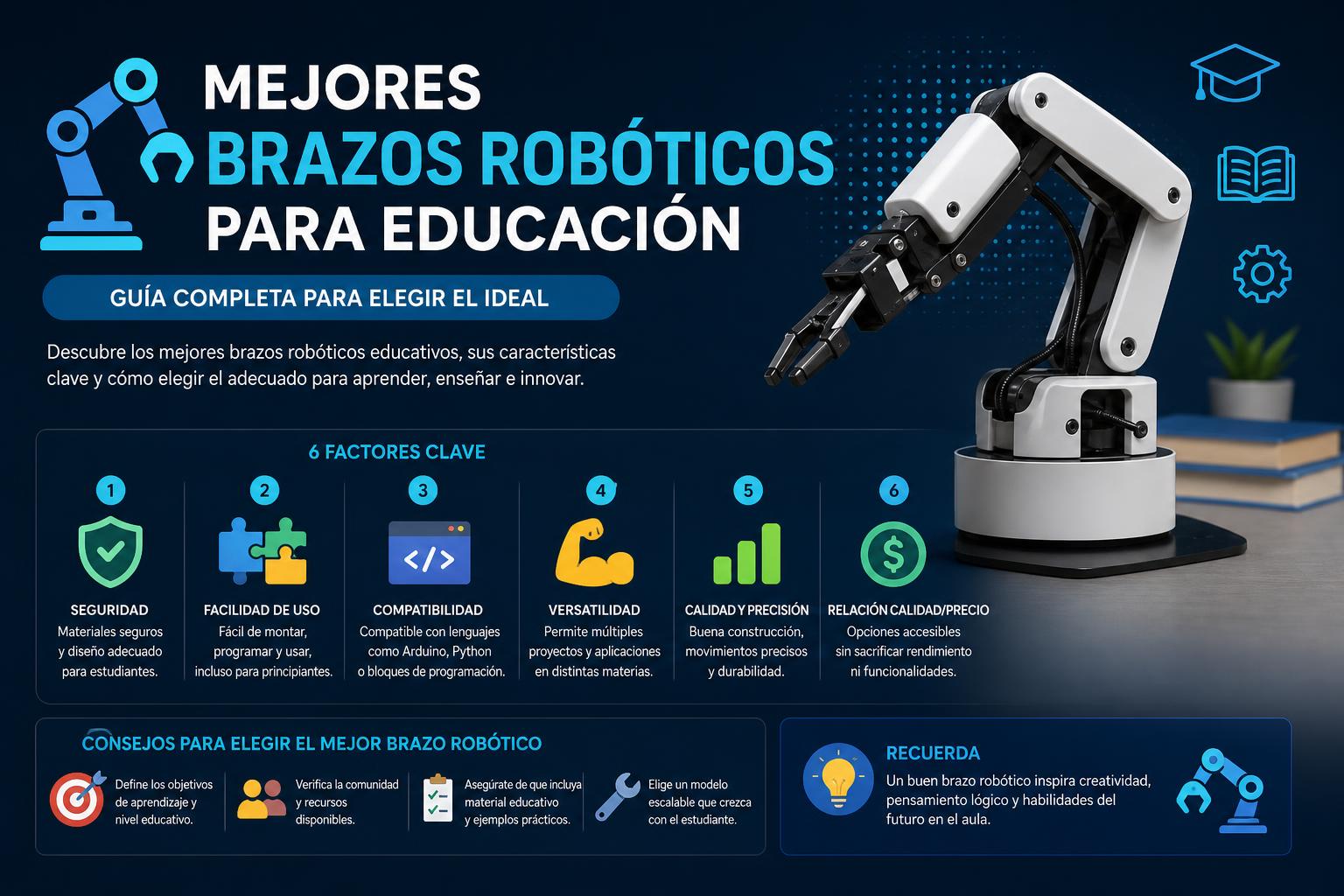
- Discover the best educational robotic arms, from basic kits to industrial and open-source models adapted to every level and age.
- Discover how to choose the ideal robot based on functionality, ease of use, compatibility, programmability, and available budget.
- Learn about current trends: AI integration, gesture control, and computer vision in the classroom, plus all the featured platforms, software, and projects
The advancement of educational robotics has generated enormous interest in schools, families, and technology enthusiasts alike. Currently, a wide variety of robotic arms for education are available, ranging from options designed for children and beginners to advanced alternatives capable of replicating industrial processes in the classroom or for personal projects. But how do you choose the best robotic arm for an educational setting? What are the differences between commercial models, 3D-printed options, and DIY kits that you can assemble yourself?
In this comprehensive article, you'll discover all the key information about the best robotic arms for education in 2024 and 2025, thanks to an exhaustive review of the most relevant comparisons, guides, and experiences currently available in Spanish on this topic. We'll analyze technical specifications, functionalities, difficulty levels, value for money, compatibility with platforms like Arduino and Raspberry Pi, open-source projects, and the essential aspects to consider before making your choice. If you want to upgrade your school's lab, boost your children's STEM knowledge, or are simply passionate about robotics, this is the ultimate guide to choosing the right educational robotic arm.
Robotic arms in education: what they are for and how they have evolved
An educational robotic arm is an articulated device, usually equipped with servomotors or electric actuators, designed to perform tasks such as grasping, moving objects, writing, drawing, 3D printing, or simulating assembly processes. In recent decades, advances in electronics, 3D printing, and the availability of open-source hardware platforms (Arduino, Raspberry Pi) have popularized their use beyond industry, making them accessible to schools, training centers, robotics clubs, and individual users.
It's no longer just about assembling a kit for fun, but about training multiple STEM (Science, Technology, Engineering and Mathematics) skills, sparking technological vocations, working on computational logic and project-based learning, improving manipulation and creativity skills, or even simulating real production processes for technical and university careers.
What types of robotic arms are available for education?
- Robotic arms, kit or commercial: They come pre-assembled or as an easy-to-build kit with parts and servos, including circuits and sometimes a controller/programmer. They usually support remote or computer control, and some add advanced features (sensors, 3D printing, etc.).
- DIY robot arms for 3D printing: downloadable from the internet and assembleable with standardized components; they allow you to learn the entire assembly process from scratch and customize the design and control.
- Open source robotic arms: Projects developed by the community, with files available to modify, expand and use in different environments (educational or makers).
- Multifunctional or industrial arms adapted for education: Advanced models with professional features, ideal for vocational training centers, universities or advanced makers.
What should you consider when choosing an educational robotic arm?
- Ease of assembly: Most educational robotic arms can be assembled without extensive knowledge, but some require a certain level of electronics or programming.
- Complexity and curriculum level: It considers the age of the students, from models for primary school to industrial alternatives for vocational training or university.
- Number of axes/degrees of freedom (DOF): More axes mean more movement and flexibility, but also more difficulty and cost.
- Compatibility and expansion: Check if it can be connected to Arduino, Raspberry Pi, or integrate sensors, cameras, 3D printing, etc.
- Programmable functions: From simple kits that are only controlled with a remote, to robots capable of executing movements through scripts, Blockly-type interfaces or Python language.
- Materials and resistance: They range from plastic or wood (for occasional use), to aluminum alloys and ABS designed to last for years in the laboratory.
Comparison of the best educational robotic arms
Below you'll find a compilation of the most relevant guides, reviews, and articles on robotic arms for teaching, with varying levels of difficulty, features, and price ranges. This will help you choose the one that best suits your needs.
Beginner robotic arms, recommended for children and elementary school
- Hydraulic robotic arm (Thumbs Up and similar)
Orientation: Ideal for children aged 8 and up, first STEM projects
Features: It is usually constructed from pressed plywood and powered by syringes filled with water (hydraulics); it requires no electricity or batteries.
Functionality: It allows you to lift light objects, turn 90º and learn principles of mechanics and physics.
Edition: Very simple, perfect as a school group workshop. It only requires minor adjustments/crafting (polishing some pieces). - MeArm (View details and files here)
A classic in educational robotics, designed with parts that are easy to cut or 3D print. An inexpensive kit, easily controlled from Arduino, Raspberry Pi, or mobile/tablet apps. - LittleArm
3D printing project designed for students and teachers, simple assembly and with its own control app. 3DOF, sufficient for basic tasks and sparking curiosity. - Educational Robotics Kit with remote control (OWI Arm Edge type)
Recommended for ages 14 and up, simple servomotors, remote control and possibility of expanding functions (programming via Arduino board added later).
Affordable price, focus on STEM and basic electronics.
Complete guide to educational robotics for the classroom: uses, kits and pedagogical keys
Programmable and intermediate-level robotic arms
- Programmable robotic arm (4 or 5 axis kits compatible with Arduino)
Functionality: They allow you to program movements, control them from your mobile phone, and add sensors or modules.
Edition: A bit more complex, ideal from 12-14 years old, includes an explanation of block programming (Scratch, Blockly…), expansion by Arduino.
Capacity: They usually support loads of up to 100-200 grams depending on the kit. - BCN3D Moveo
Open project from Barcelona, specifically designed for the education sector. Four degrees of freedom, fully 3D printable, and with detailed instructions. Allows for customization and expansion; recommended for vocational training or university. - EEZYbotARM MK2
Easy to assemble, very popular for technology classes, ideal if you want to experiment with Arduino projects and modify the design to your liking. - Roboteurs RBX1 Remix
Quick to assemble, works with Raspberry Pi, sturdy mount, and modern design. Great for robotics clubs and for experimenting with more advanced programming.
Open source projects and 3D printing: educational freedom and personalization
Open-source robotic arms have gained popularity thanks to platforms like Hackaday, Thingiverse, and GitHub. They allow teachers and makers to 3D print both their own arms and all the accessories and spare parts. Among the most notable for education are:
- Thor (): Completely free 6DOF model, excellent for advanced learning (miniature industrial setup).
- Zortrax Robotic Arm: 5DOF design, highly focused on facilitating expansion with interchangeable heads.
- EEZYbotARM, LittleArm, Roboteurs RBX1: all with documentation, plans and tutorials, easy-to-replace parts, compatible with Arduino/Raspberry Pi.
Main advantages: freedom to modify design, low cost (only material and servos), learning from printing and programming, adaptation to each educational level.
Disadvantages: It requires a 3D printer and some technical expertise to print and assemble correctly.
Industrial robotic arms for technical and university training
In vocational training and higher education, there is growing interest in collaborative industrial robotic arms, which simulate real assembly processes and provide practical experience in automation. Advanced examples to consider (source: EVSINT.com ):
- Universal Robots UR20: Up to 6 axes, intuitive programming, 20kg maximum load, widely used in educational production lines and prototyping. Accuracy ±0,05mm.
- Fanuc CRX-25iA and LR Mate: Widely used in FP, large load range and extreme precision, compatible with industrial standards, easy to integrate into didactic assembly lines.
- Epson SCARA Series: High-speed robots for control experiments, machine vision testing, and micro-assembly.
- ABB IRB 1100, EVST FlexArm S5, Doosan M0609: New robots, ideal for microprocessing, electronics, AI vision practices, gesture control, sensor integration, and advanced safety.
- Siemens mobile manipulators: Examples of next-generation collaborative robots that combine autonomous mobility with articulated arms to experiment with AI and adaptability.
These robotic arms not only provide students with realistic technical experience, but also allow for the simulation of smart factory environments, flexible automation, and computer vision exercises. However, they are more expensive, so they are usually only available at centers with specialized equipment.
What to ask before choosing a robotic arm for education
- What is the specific objective? Science outreach and STEM for children? Vocational training in automation? Maker workshop? Setting up an Industry 4.0 classroom?
- What level of programming skills do users possess? Some robotic arms are programmed in block-based languages, while others require C, Python, or even Matlab.
- Is integration with external platforms necessary? Some robots allow you to add machine vision, wifi/bluetooth controls, integration into existing lines, etc.
- What's my budget? The range goes from less than 50 euros (basic kits) to several figures for professional robots.
- Does it require a license or support? Kits with institutional support offer predictive maintenance and remote assistance. The maker community typically maintains up-to-date forums and tutorials.
- Is it advisable to be able to 3D print it? The DIY option in 3D printing for customization, repair and learning is always a plus for teachers and makers.
Compatible educational platforms, software, and programming languages
One of the major advantages of educational robotics in 2025 is the ability to adapt learning to the age and knowledge of the students. In mid-range and high-end models, compatibility with the following is common:
- Arduino: Ideal for getting started in electronics, sensors and basic automation.
- Raspberry Pi: preferred in advanced programming, learning Linux operating systems, or computer vision and artificial intelligence applications.
- Blockly and Scratch: Visual environments for programming movements with blocks, recommended for primary and early secondary school years.
- Python: increasingly standard, both for basic scripts and for AI projects and sophisticated manipulation.
- Open APIs: Many robots, such as the Dobot Magician and Fairino FR20, offer REST APIs or SDKs to expand their capabilities from any language (Javascript, C++, etc.).
- Programming by demonstration and gesture control: In advanced models such as 7Bot, Doosan M0609 and mobile manipulators, it is possible to "teach" movements to the robot and have it repeat them, or control it from Leap Motion, haptic gloves, etc.
Technical aspects: Payload, accuracy, repeatability and safety
The capacity of a robotic arm for education is usually measured by:
- Number of axes (or DoF): from 3-4 axes in basic and quick assembly models to 6 or more in industrial or open source projects.
- Maximum payload: For kits/toys, between 50g and 200g; for mid-to-high-end robots, it usually ranges from 500g to 20kg in educational industrial applications.
- Reach: operating length from the base to the gripper (usually between 20 and 80cm in most educational arms).
- Accuracy and repeatability: This is a critical aspect in projects that aim to simulate real-world processes. Typically, the accuracy is between ±0,1mm and ±0,5mm in educational applications (industrial models reach ±0,01mm, such as the Epson SCARA or ABB IRB 1100).
- Control system: They can be controlled from mobile apps, physical panels, remote controls, scripts, or even web interfaces. Ease of use is key in the school environment.
- Safety: Modern robots incorporate torque sensors, emergency stop systems, collision detection, and user interfaces that minimize risks.
Quick comparison: Buying guide based on your educational goal
| Model/Project | Difficulty level | Recommended for | Target price | Strengths |
|---|---|---|---|---|
| Hydraulic robotic arm | Very easy | Primary school, basic STEM workshops | <50 € | Learn mechanics, low cost, safe |
| MeArm/LittleArm | Easy | Introduction to robotics with Arduino | 30-70 € | Customizable, open platform |
| BCN3D Moveo | Media | Vocational training, secondary education, makers | Printing and servos: from €120 | Adaptable teaching materials |
| Dobot Magician | High average | Schools, vocational training, universities, advanced makers | €800-1500 (depending on accessories) | Multifunctional, robust, educational support |
| Thor/Roboteurs/LittleArm/EEZYbotARM | High average | Upper secondary/Vocational training/University | Variable (materials only, €60-300) | Open source, expandable, realistic learning |
| UR20/Fanuc/Doosan industrial | High/professional | University, advanced vocational training | 10.000 € + | Precision, safety, real-world industry experience |
Trends: AI, gesture control, mobile robotics, and computer vision
Recent technological advances have driven the integration of artificial intelligence systems , gesture control, and computer vision into educational robotic arms.
- AI-guided robotics: It allows for greater adaptability, autonomous robot learning, and precise control for complex assemblies.
- Gesture and haptic control: There are already kits and platforms to control robotic arms using gestures with Leap Motion or haptic gloves, improving interaction and multisensory learning.
- Mobile manipulators: The new arms can move and operate at different workstations, combining autonomy, computer vision and collaboration with humans (like Siemens projects).
- Full compatibility with modular platforms: Increasingly, robots allow for the exchange of limbs, tools, or the integration of custom 3D-printed modules.
Real-world examples show how collaborative robots in school and vocational training settings are a transformative tool for learning industrial processes, ensuring safety in robotics, and preparing students for the professional world.
Frequently Asked Questions about Educational Robotic Arms
- How long does a school robotic arm last? They usually have a lifespan of 8-12 years with good maintenance, especially those made with ABS and aluminum.
- Is it easy to reprogram and maintain? Educational kits and open source tools can quickly update their tasks through blocks or scripts.
- Can you use them with existing mounting systems? The most advanced robots (Fanuc, UR, Dobot) allow full integration with teaching tapes and lines.
- What safety certifications should it have? It seeks compliance with ISO 10218/ISO-TS 15066 standards.
- What technical support is available? Kits with institutional support offer predictive maintenance and remote assistance. The maker community typically maintains up-to-date forums and tutorials.
Final recommendations and useful resources
Each educational center or maker group should choose the type of educational robotic arm best suited to its level, budget, and aspirations. For beginners, hydraulic or simple assembly kits (MeArm, LittleArm) allow for low-cost experimentation with minimal risk. Open-source platforms and printable projects (Thor, BCN3D Moveo, EEZYbotARM) are a perfect springboard for secondary school, high school, and vocational training, while also being ideal for those who want to learn electronics, 3D printing, and advanced programming.
When versatility and professionalism are required, multifunction commercial models like Dobot Magician or Makerarm offer the safety, documentation, and robustness needed for intensive classroom use. In university laboratories or advanced vocational training centers, industrial collaborative robotic arms such as Universal Robots, Fanuc, or ABB IRB open the door to real-world automation operations, advanced integration, and secure control.
The world of educational robotics continues to grow, incorporating the latest trends in artificial intelligence, sensors, visual interfaces, and computer vision. Choosing the right approach depends on a combination of learning objectives, technical resources, class format, age, and anticipated medium- to long-term use.
In addition to the content of this guide, you can consult projects and files at MyBotRobot , Dobot Spain , Camp Tecnológico , EVSINT , and the GitHub and Hackaday.io platforms to have all the updated resources and enhance practical learning with the best robotic arms for education.
Complete guide to choosing the best educational robotics kits: Comparison, benefits and age recommendations