
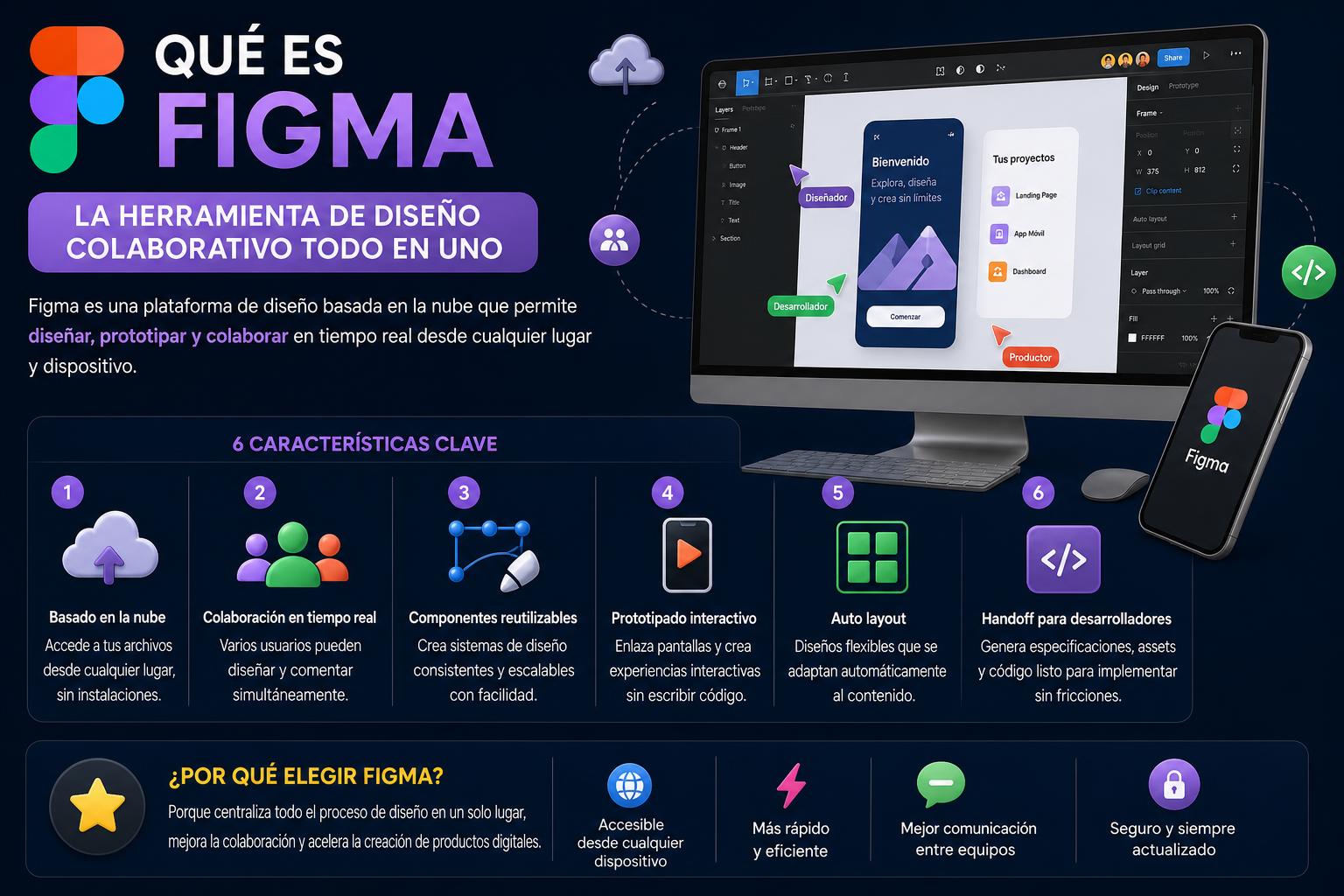
- Figma is revolutionizing digital design through its collaboration and cloud-based prototyping capabilities.
- It allows you to create, share, and validate web and mobile interface prototypes in real time.
- It offers free plans and educational resources that facilitate learning at all levels.
- It is the preferred option compared to other alternatives thanks to its collaborative approach and constant innovation.
If you work in digital design, user experience, or on creative teams, you've surely heard of Figma . This innovation has not only revolutionized how interfaces are designed, but has also radically transformed collaboration in creative processes.
But what makes Figma so special, and why has it become a favorite tool for UX/UI designers, developers, and tech companies? If you want to find out and master all its secrets, today we bring you a complete guide where you'll find everything you need to know about the leading collaborative design platform.
What is Figma and what is its origin?
Figma is a cloud-based graphic design and interface application focused on the collaborative, real-time creation of digital projects. It was founded in 2012 by Dylan Field and Evan Wallace, who identified the need for a powerful yet accessible solution. After several years of development and funding rounds, Figma was publicly launched in 2016 , quickly establishing itself as a modern alternative to apps like Sketch and Adobe XD.
One of Figma's milestones was enabling the editing and prototyping of interfaces directly from the browser , eliminating the need for cumbersome licenses and local software installations. This allowed multicultural and remote teams to collaborate on projects easily, without the typical versioning and compatibility issues that existed in the traditional digital design environment.
What is Figma for?
The true value of Figma lies in the breadth of functions it offers for all aspects of digital design . These are its main applications:
- User interface (UI) design: His heart is in creating mockups, wireframes, and reusable components For websites and apps. You can work from the initial structure, establishing visual guides and navigable prototypes, all the way down to the finest details of interaction and usability.
- Advanced prototyping: With Figma it's possible simulate real navigation of websites or mobile applications, by linking screens and interactive elements. This facilitates both internal usability testing and the presentation of progress to clients.
- Real-time collaboration: One of its key differentiators. Teams of designers, developers, product managers, or writers can edit the same file simultaneously and leave comments directly on the design. No more back-and-forth emails, outdated versions, or issues with attachments.
- Creation and management of design systems: Figma allows teams build component and style librarieswhich guarantee visual consistency and efficiency. Changes made to one element are automatically updated wherever it is in use, simplifying maintenance and scalability of projects.
- Export of resources: The designs can export in formats such as PNG, SVG or PDFThere are even native tools and plugins to facilitate delivery to development, including design system specifications and variables.
- Presentations and brainstorming: Beyond the UI, with Figma Slides You can create interactive visual presentations, integrating designs and gathering live feedback. Furthermore, FigJam It adds the option of collaborative online whiteboards, ideal for brainstorming, planning and shared diagrams.
Key features: What makes Figma unique?
Figma's success is based on its "all-in-one" approach:
- Direct cloud editing Regardless of the operating system: any team member can work from a PC, Mac, or even a tablet with a browser. Desktop applications are also available for those who prefer them.
- Real-time automatic savingEvery change is saved instantly, and you can check the history to revert without losing anything. No more worrying about forgetting to save a file.
- Offline mode and mobile apps: Although the ideal experience is in the cloud, Figma has complementary applications (such as Figma Mirror on iOS and Android) to view and review prototypes on mobile devices.
- Intuitive interfaceFigma lowers the barrier to entry for those with no experience in design software. Its menus are clear, and there are numerous free resources and tutorials to help you get started quickly.
- Automatic UpdatesBeing online, all users enjoy the latest version with new features, without having to install anything extra or pay for future upgrades.
- Plugins and community: There's a vibrant community where you can share templates, components, and design systems. Plus, there's a marketplace of plugins for advanced tasks like accessibility, exporting, documentation, and integration with Slack, Jira, or GitHub, among many others.
How does Figma work? Getting started and working environment
To start using Figma, simply create a free Figma account . From there, you can create teams, add collaborators, and organize all your projects into folders and files.
Workspace and organization
Figma's canvas is extremely large (up to 65.000 pixels per side), making it easy to group all related screens of a project within a single file. The use of frames allows you to select different resolutions (mobile, tablet, desktop, watches, etc.) and even create variations to see how the design behaves in each case.
Components, libraries, and design systems
One of Figma's greatest strengths is the ability to create reusable components . These elements (buttons, menus, icons, cards, etc.) can be instantiated as many times as desired. If you modify the base version, all clones are updated immediately.
By associating colors, fonts, effects, or radio styles with these components, a consistent and easy-to-maintain design system is built . Libraries can be shared between teams and even imported from the global Figma community, fostering collaboration and collective inspiration.
Figma has a dedicated section called Prototype that allows you to connect screens to each other through interactive nodes: you can visualize transitions, simulate clicks, drop-down menus and the entire end-user experience, facilitating testing and presentations before developing anything in real code.
Comments and feedback cycle
Figma files incorporate a collaborative commenting system : you can leave notes on specific design elements, reply in threads, or assign tasks and changes. Some versions even allow automatic transcription of verbal feedback , speeding up the review process with your team or clients.
Additional tools: Figma Slides and FigJam
Figma Slides is a solution for creating and sharing visual presentations, ideal for project presentations, documentation, or sharing prototypes. You can insert mockups and prototypes, add interactive widgets to gather feedback, and collaborate on building the presentation.
FigJam , on the other hand, is geared towards creative collaboration on virtual whiteboards . It's very useful in the early stages of projects for brainstorming, planning, process mapping, or simply drawing and sharing thoughts visually as a team. It includes easy-to-use tools for adding sticky notes, emojis, embedding images, and many features for remote participation.
Main advantages and benefits of Figma
- True multiplatform access: It works from any modern browser regardless of the operating system (Windows, macOS, Linux, tablets…)
- Generous free plan: The Starter version allows you to work with up to 3 active design files and saves version history for 30 days. Students and teachers can benefit from this. free educational programs which include advanced features.
- Real-time collaboration: It simplifies workflows and eliminates typical versioning problems, because Everyone edits and sees the changes instantly., from the first sketch to the final prototype.
- No need to install or update programs: Progress is automatically saved in the cloud, preventing version loss, tedious installations, or incompatibilities between devices.
- Wide variety of resources and active community: You have access to a multitude of tutorials, templates, design systems and a massive user network where you can continuously learn, share or be inspired.
Is Figma free? Plans and licenses
Figma offers a free plan ideal for individuals and small teams . This includes 3 design files, unlimited use of FigJam, and basic collaboration. If you need more capacity, there are paid plans with features designed for large teams, agencies, or tech companies (more files, administrative controls, analytics, advanced permissions, etc.).
Students and teachers can access the professional version at no cost upon accreditation, which has made Figma a standard in design schools and technology bootcamps.
What makes Figma different from other tools?
Figma focused its proposal on online collaboration from the very beginning, unlike traditional solutions (such as Sketch or Adobe XD ) that depend on local installation and are usually more focused on closed ecosystems like macOS.
Some points that make the difference are:
- Live multi-user accesswhere anyone can instantly edit and comment on the same file.
- Automatic Updates frequent without additional facilities.
- Open community and a marketplace of resources that enhance work speed and creativity.
- Direct integrations with management platforms (Slack, Jira, GitHub) and a growing ecosystem of plugins.
- The Dev Mode functionDesigned for developers, it facilitates the inspection of designs, export of assets and management of variables, making the transition from design to code more agile.
- constant innovation with AI-powered tools, such as automatic website creation (in beta) and improvements to AI-assisted features.
- The Figma Mirror mobile apps to see how your prototype will look on different devices effortlessly.
Figma and training: Is it easy to learn?
Figma has a surprisingly shallow learning curve. Thanks to its intuitive interface and abundance of free learning resources , both beginners and experts find it easy to adapt. Many schools and digital design courses include Figma from the start, as it allows students to work on real-world projects in teams, simulating professional working conditions.
You have access to official courses, short tutorials, webinars, user communities and forums in both Spanish and other languages, which speeds up learning and the resolution of doubts.
Figma alternatives and competition
While Figma has become the global benchmark for collaborative design, there are other options to consider:
- Sketch: preferred by some designers in macOS environments, although it has lost ground to Figma's cloud collaboration.
- Adobe XD: a good option if you're in the Adobe ecosystem, offering native integrations but less geared towards simultaneous collaboration.
- InVision: widely used in the prototyping and presentation stage, although its pure design functions are not as developed.
- Balsamiq Wireframes: ideal for quick wireframes, although far from the advanced features of Figma.
The choice depends on the workflow, the size of the teams, and the need to collaborate in real time, where Figma almost always comes out on top.
Why should you use Figma in your projects?
Today, both innovative agencies and large technology companies use Figma for the agility and security it brings to all design processes. Whether launching a digital startup, developing websites, prototyping a mobile app, or documenting and managing a design system, using Figma will save you time, reduce errors, and increase the quality of the final result.
By leveraging its collaborative, multi-platform, advanced prototyping capabilities and vibrant ecosystem of resources , you ensure you are always at the forefront in an increasingly competitive and demanding market.
Using Figma in digital projects provides a significant competitive advantage, as it optimizes every stage of the creative process and promotes collaborative innovation in multidisciplinary teams.
What is Canva and what is it used for: a complete guide to the online design tool