
- Discover how the kits of educational robotics They promote STEAM skills and social competencies in children and adolescents.
- Learn about the key factors for choosing the ideal robotics kit based on the age and educational goals of the students.
- Analyze detailed comparisons by age range and the main featured brands, such as Lego education and Makeblock.
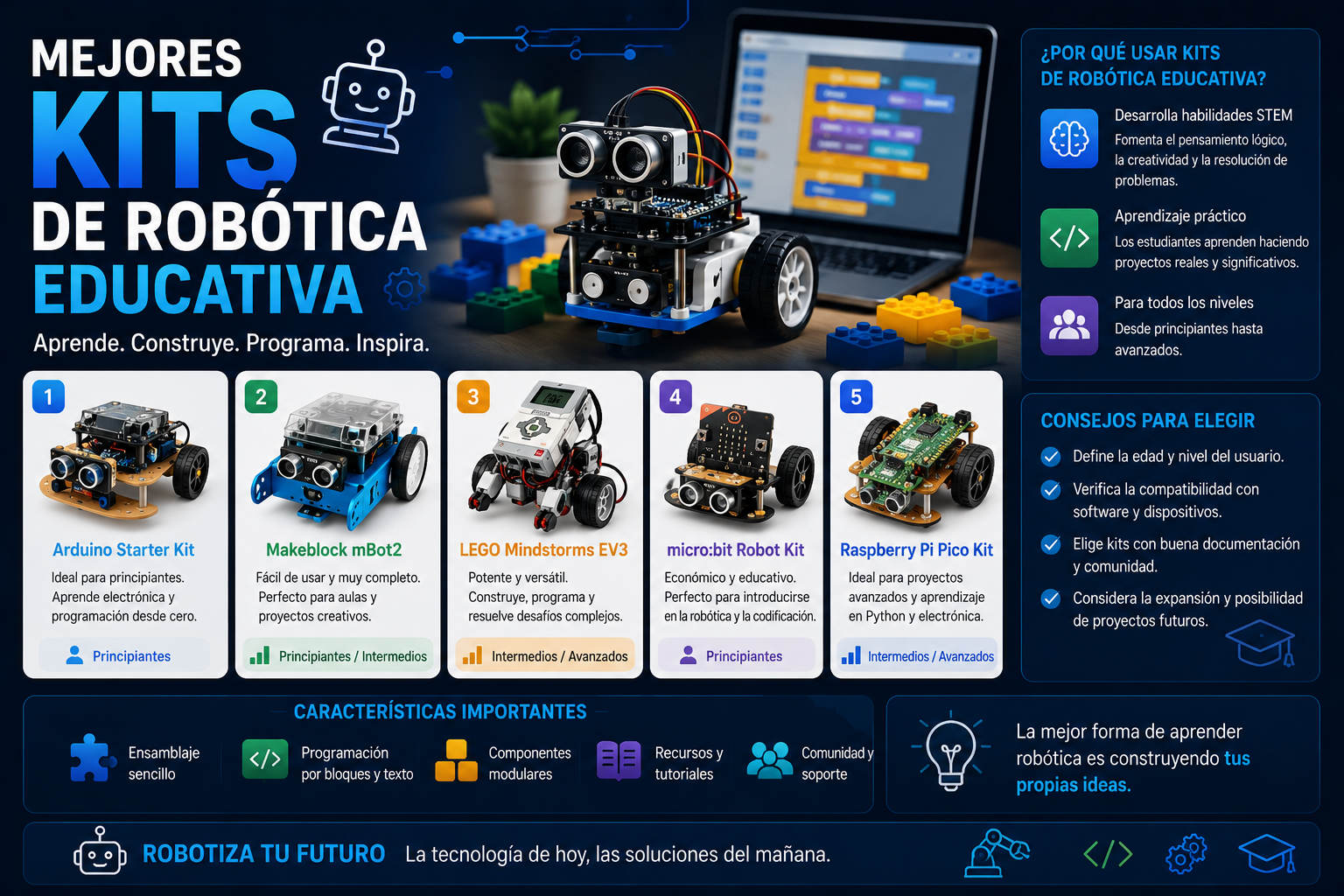
Educational robotics is revolutionizing the way children and young people of all ages learn about technology, science, and problem-solving . Beyond simply assembling robots, robotics kits represent a powerful tool for developing STEAM (Science, Technology, Engineering, Arts, and Mathematics) skills, as well as promoting valuable competencies such as teamwork, creativity, and communication.
If you're a teacher, parent, or simply passionate about introducing young children to programming and electronics, you've probably asked yourself a big question : how do you choose the right educational robotics kit from the wide range of options available today? This article is designed to help you make the best decision, with a comprehensive review based on the experience of leading experts, user feedback, and the most thorough guides. Here you'll find everything from comparisons by age and skill level to an overview of the benefits, types of kits available, brand recommendations, and practical buying advice.
Why invest in robotics kits in education?
Robotics applied to education is much more than a fad . It's an innovative methodology that uses robots and construction kits as a fundamental part of the learning process in a multitude of disciplines. Beyond the technical aspects, educational robotics projects help lay the foundations for programming, electronics, and innovation at ages as early as preschool or primary school.
The benefits don't stop there. Incorporating robotics in the classroom or at home allows for:
- Develop logical and critical thinkingfacilitating problem-solving and mathematical reasoning.
- Stimulate creativity and innovationby posing challenges in building and programming robots with real-world tasks.
- Promote communication and teamwork skillsessential for any professional or personal context.
- To enhance motivation and meaningful learningby allowing students to be creators and not just passive consumers of technology.
- To make visible the integration of the ICT in education, aligning school curricula with the demands of the 21st century.
According to the experiences of numerous teachers and schools, robotics kits are now an essential component of innovative curricula . They help combat technology apprehension and transform the classroom into an environment of experimentation, where learning is practical and fun.
What exactly is an educational robotics kit?
An educational robotics kit is not simply a toy, but a carefully designed set of parts, sensors, and electronic components that allows you to assemble, program, and control one or more robots or prototypes. These kits go far beyond traditional construction sets, incorporating programming, electronics, and mechanics adapted to different ages and skill levels.
Most kits contain the following common elements:
- Control unit or "main brain": the core of the system, whether it's a microcontroller like Arduino, boards like micro:bit, or smart LEGO bricks.
- Motors and actuators: to give the robot movement, control wheels, arms, lights…
- Various sensors: to detect obstacles, identify colors, measure temperature, ambient light, among others.
- Structural and assembly elements: building pieces (plastic, metal, LEGO pieces…), screws, wheels, gears, etc.
- Tools and accessoriesScrewdrivers, cables, and, in some kits, storage bags to keep everything well organized.
- Documentation and instructions: indispensable for guiding step by step the assembly and programming of the robot, whether in physical or digital format, often through interactive apps.
Depending on the kit, you'll find different levels of difficulty . Some are designed so that young children can assemble their robot almost independently, while others allow for complex and fully customized projects, ideal for high school students or even adults.
What skills and values are developed through educational robotics?
The impact of robotics kits on learning is not limited to technical concepts . Below, we review the main aspects that children develop when working with educational robots:
- Critical and logical thinkingStudents analyze problems, detect errors and seek solutions, applying mental schemes useful for areas such as mathematics or science.
- Creativity and innovationBeyond following instructions, the possibility of designing new models and programming behaviors stimulates imagination and "outside the box" thinking.
- Collaboration and social skillsMany robotics projects are worked on in groups, enhancing leadership, negotiation, effective communication and teamwork.
- Resilience and frustration managementAssembling a robot that doesn't work the first time teaches children to manage frustration and persevere until they achieve their goal.
- digital literacy: familiarizes students with programming, electronics and computational logic, basic pillars in today's world.
Educational robotics prepares children and teenagers for a world where technological proficiency and the ability to learn independently will be increasingly valued . For this reason, more and more schools and institutions are including robotics as a subject or cross-curricular activity in their curriculum.
Key factors for choosing an educational robotics kit
Before you rush out to buy a robotics kit, it is essential to consider a series of criteria to ensure that the choice is suited to the level, interests, and educational needs of the person or group that will use it:
- Recommended ageThis is one of the most important aspects. A kit intended for young children is usually simpler, with large pieces and basic programming tasks. In contrast, kits for middle school or teenagers allow for complex structures, multiple sensors, and more advanced programming challenges. Forcing the difficulty can cause demotivation or frustration.
- Brand and support: major brands such as Lego education y Makeblock Education They stand out for their quality, variety of resources and educational materials, as well as extensive warranties and app updates. Choosing a recognized brand usually guarantees a safer and more enriching learning experience.
- Educational objectivesThink about the skills you most want to develop (programming, mechanics, logic, creativity, teamwork, etc.) and check which kits allow you to develop them exponentially.
- Ease of use and learning curveCheck if the kits adapt progressively in complexity, allowing you to advance to a higher level as the user gains experience.
- Compatibility and scalabilitySome kits allow you to add new parts, sensors, or program them in different languages as you progress (for example, Scratch or Python).
- Box contentsMake sure it includes all the necessary components and check if it has multimedia resources, intuitive apps, suggested exercises, or access to online communities.
Comparison: The best educational robotics kits by age
To help you choose, here's a comprehensive comparison based on information from leading websites and experts in educational robotics. The comparison is divided into three main categories: preschool, primary, and secondary. We've also included some special options for adults or more advanced users.
Kits for early childhood education (under 6 years old)
At this stage, robotics focuses on strengthening logic, symbolic play, and the understanding of basic sequences . The kits are designed with large pieces, bright colors, and hands-on activities of minimal difficulty.
- LEGO Education – Coding Express: Coding Express It's an interactive construction train with 234 bricks and a free app, designed for children aged 2 to 6. It stands out because it's easy to assemble, each track color has a function (stop, reverse, turn on lights, make sounds), and it encourages an initial introduction to sequential programming and collaboration. It includes educational materials and lessons to explore STEAM concepts in a fun way.
- Makeblock Education – mTiny Discover Kit: mTiny It's a small panda-shaped robot that moves thanks to instructions given with a special stylus. It includes a complete interactive map with different scenarios, more than 30 possible interactions, and many accessories. Its "personalities" allow the robot to express emotions and react to different challenges, encouraging children to think logically and creatively while improving their social skills.
Primary education kits (ages 6-12)
This stage is ideal for getting started with more advanced programming, using sensors, assembling complex structures, and beginning to experiment with concepts such as variables, loops, and conditional logic.
- LEGO Education – SPIKE™ Essential: SPIKE™ Essential This is LEGO's flagship offering for elementary school students. Designed for students aged 6 to 12, it contains four minifigures, over 449 LEGO pieces (including sensors, small motors, etc.), and allows for the construction of countless models guided by apps. It facilitates progressive learning, starting with blocks and icons and evolving towards word-based programming like Scratch. It includes classroom-ready activities and materials to develop mathematical, linguistic, and technical skills.
- Makeblock Education – Codey Rocky: Codey Rocky It's perfect for getting started in robotics and programming from scratch. It consists of Codey (the programmable brain with an LED screen and sensors) and Rocky (the mobile base with motors and extra sensors). It allows programming from a block-based graphical interface, mimicking the Scratch 3.0 environment. It also supports transitioning to Python for advanced users. It's ideal for fostering creativity and collaborative work.
Kits for secondary school (from 10/12 years old and up)
At this stage, robotics takes a qualitative leap forward with the introduction of advanced programming, the integration of smart sensors, and the customization of complete robots . Here, the kits become more sophisticated, enabling truly engaging engineering and technological challenges.
- LEGO Education – Spike Prime: Spike Prime It allows for a seamless transition from primary school and masters the Gamification and STEAM learning in secondary school. It includes LEGO bricks, angular motors, and smart sensors for color, distance, and force. Programming can be done using Scratch-like blocks or progress to Python (greater complexity). Its resources for working on long-term projects and incorporating data analysis are particularly noteworthy.
- Makeblock Education – mBot2: mBot2 It represents the latest generation of educational robots. It incorporates CyberPi, an advanced microcontroller with cloud connectivity, a color screen, and tools for exploring Artificial Intelligence, IoT, and data science. It enables block-based programming and Python, and its hardware allows for interactive activities such as speech recognition, data analysis, and collaboration between multiple robots. It is especially suitable for teenagers and for preparing for robotics competitions.
- Elegoo UNO R3 Project Smart Robot Car Kit V3.0: Elegoo UNO R3 Car Kit This is an excellent Arduino UNO-based option, especially suitable for young people over 10 years old and also for beginner adults. It comes with an original Arduino UNO board, all the sensors and mechanical components needed to build and program a "smart" car. It allows for remote control modes, line following using infrared sensors, and obstacle detection. It is programmed using the traditional Arduino environment, with the option to connect to graphical environments like mBlock or Scratch.
Other notable options
We cannot fail to mention other kits and brands that have proven to be a great choice in a family or educational context, both for younger children and for those seeking an alternative or personalized experience.
- Micro:bit + Robot Maqueen (for example, the kit of bricogeekDesigned for introduction to school robotics, this kit integrates the Micro:bit V2.2 board with its Bluetooth capability, light, temperature, and motion sensors, and all the actuators of the Maqueen robot (motors, infrared sensors, buzzer, RGB LEDs, and distance sensor). It's ideal for those who want to learn with the Micro:bit educational platform and experiment with expansion projects and block programming.
- Clementoni – Cyber Robot and Robomaker: Clementoni It offers affordable kits like Cyber Robot (an easy-to-assemble robot with five game modes and a control app) or Robomaker (build five different models, control and programming via blocks, educational apps, guided activities, and modular parts). These are especially recommended for those looking to build and program robots as an after-school family activity.
- Robo Wunderkind – Education KitThis kit uses different colored blocks (each with a specific function) that connect easily. It includes a main block and LEGO-compatible accessories, allowing you to create unique robots and customize scenarios. It is appreciated by young children for encouraging intuitive manipulation and associative logic.
Typical components of a robotics kit: what can you expect to find in the box?
As many experts point out, robotics kits can be differentiated by the type and quantity of parts, ease of assembly, and the variety of challenges and activities they offer. Generally, the main components of a complete kit are:
- Central unit or microcontroller: determines the robot's "brain". It can be an Arduino board, micro:bit, LEGO Intelligent Brick, etc.
- Electric motors and servos: necessary to provide movement to the wheels, arms or other moving parts.
- Multiple sensorsInfrared, light, temperature, ultrasound, color or contact, depending on the model.
- Structural components: from LEGO bricks to metal plates, wheels, axles, connecting pieces, screws and nuts.
- Tools and assembly componentsScrewdrivers, cables, brackets, storage bags.
- Instruction manual and digital resources: detailed guides, videos, assembly apps, educational activities and interactive tutorials.
Some brands include extra resources such as programming cards, game maps, themed scenarios, sensors, or spare motors, which greatly expands the experience and durability of the kit.
Key differences between the main types of educational robotics kits
In the current educational robotics market, three main families of kits stand out, geared towards different ages and profiles :
LEGO-based kits
LEGO is undoubtedly the leading brand in construction toys and innovative learning solutions for schools worldwide . Among its greatest strengths are:
- Quality and durability: robust parts, perfectly assembleable and made with safe materials.
- Ease of use: highly visual instructions and step-by-step guided assembly applications, accessible in both physical and digital formats.
- VersatilityThe different models (WeDo, Boost, Spike Essential, Spike Prime and Mindstorms) are designed to cover needs from preschool to high school.
- Wide community of usersConstant updates of activities, support forums, and new projects uploaded by users worldwide.
- Compatibility and expansion: pieces from other LEGO sets can be added, multiplying the creative possibilities.
- Intuitive programming: Scratch-like visual environments and integration with third-party software.
Arduino-based kits
The Arduino platform is an open-source hardware and software project that allows the design of programmable boards accessible to any user.
Main advantages:
- Total flexibility: from assembling the hardware itself to programming in text (C/C++) or using blocks thanks to compatible tools (mBlock, Bitbloq, Blocky and similar).
- Maximum personalization: allows adding new sensors, actuators and expansion modules.
- Ideal for older agesAlthough starter kits exist, most are designed for secondary school, high school and adults with minimal knowledge of electronics.
- broad global community: countless manuals, tutorials and forums to answer questions and share projects.
Alternative and modular kits
Besides LEGO and Arduino, there are other kits specifically designed for early childhood or family activities, such as:
- Micro:bit + Maqueen: platform designed for primary education, with great ease of programming and Bluetooth connectivity.
- Robo Wunderkind: modular blocks with functions differentiated by color, intuitive assemblies and apps with very user-friendly visual programming.
- Clementoni Cyber Robot and Robomaker: affordable options for families who want to experiment without a large initial investment.
Purchase recommendations: Where to buy your educational robotics kit?
Depending on the type of kit, you can find them in physical stores or online retailers specializing in robotics and education . Some practical recommendations:
- LEGO KitsThey are easy to find in large stores such as El Corte Inglés, Carrefour, Fnac, or shops specializing in educational toys. The models most geared towards education (Education range) are usually sold through authorized distributors and specific platforms such as Robotix.es o Electrolab briefcase.
- Arduino kits and advanced roboticsThey are generally purchased online from stores like Bricogeek, robotopia and other specialized platforms. Amazon also has a wide selection in this segment.
- Alternative/modular kitsThey are usually found both online and in physical stores focused on technological education.
Final tips and best practices for getting the most out of an educational robotics kit
Acquiring a good kit is just the first step . To make the educational experience truly meaningful, we recommend:
- Involve the children in the whole processFrom assembly and configuration to customization and programming, they learn much more by "doing" than by observing.
- Use the apps and educational materials that come with each kitTake advantage of structured activities, progressive challenges, and interactive tutorials to ensure learning and prevent boredom.
- promote collaborationMany kits allow group work, which encourages socialization, assertive communication, and role management.
- Integrate robotics into interdisciplinary contextsUse the kits to practice math, science, language arts, or even art. The possibilities are endless!
- Share and find inspiration in the communityMost manufacturers have forums, project repositories, and online communities where you can discover new activities and get your questions answered.
This guide has covered everything essential to understanding how educational robotics kits are becoming one of the best tools for the holistic development of children and teenagers. They not only allow children to learn programming, electronics, logic, and mechanics, but also promote values such as creativity, teamwork, and perseverance. Choosing the right model (according to age, interests, and skill level) is key to enjoying the process and getting the most out of an active, hands-on learning experience full of stimulating challenges. Technology is not the destination, but rather the path to training the creators and problem solvers of the future.
What is Scratch: a complete guide to the visual programming language for learning by creating