
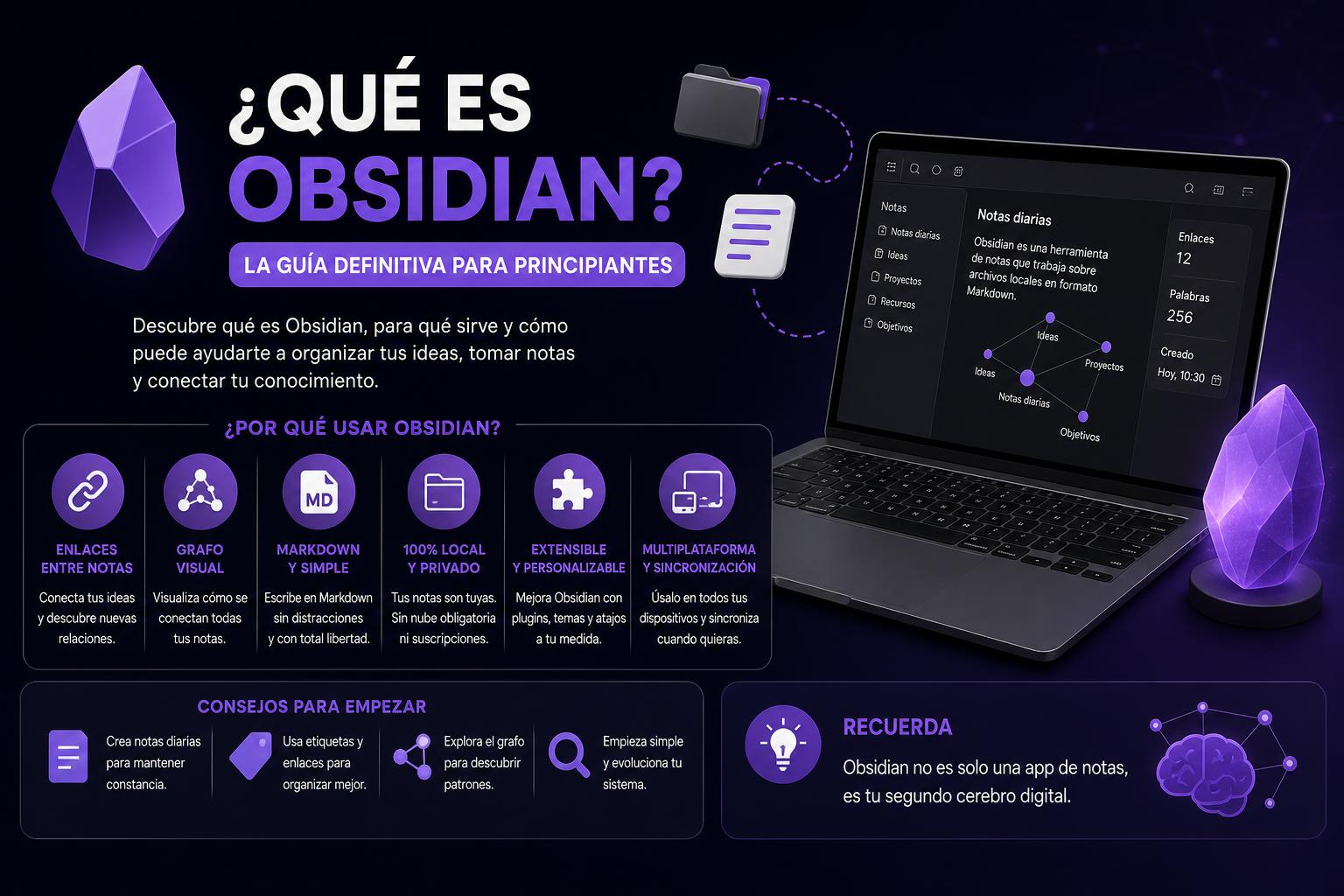
- Obsidian stands out for its flexibility, link-based structure, and privacy.
- It allows you to organize ideas visually and in a customizable way, useful for education and projects.
- The community contributes thousands of plugins, multiplying its potential and adaptability.
In today's world, where information flows at breakneck speed and personal knowledge management has become an essential skill for both students and professionals, tools like Obsidian have gained undeniable prominence. You may have heard it described as a 'supercharged notepad,' but what truly sets it apart from other traditional note-taking apps?
In the following lines, we'll delve into what Obsidian is, what it's for, its main features, how to use it, and why it's revolutionizing the way we organize ideas and projects. If you're interested in personal productivity, academic organization, or simply looking for a flexible tool to manage your daily life, here's everything you need to know about Obsidian.
What is obsidian and what is its origin?
Obsidian is a cross-platform, plain-text-based note-taking and writing application designed to organize and connect ideas in a flexible and intuitive way. Unlike other note-taking tools, Obsidian focuses on allowing you to create a truly personalized knowledge network, where each note can be linked to others, generating a mind map or visual chart of your thoughts and projects.
Obsidian has an interesting backstory. The project was founded in 2020 by Shida Li and Erica Xu, who, during the COVID-19 pandemic lockdown, found the perfect opportunity to develop this innovative application. The two engineers met at the University of Waterloo and had already collaborated on other technology projects. In October 2022, they launched version 1.0, and its evolution hasn't stopped since, thanks to an extremely active community and the addition of Steph Ango as CEO in 2023. You can learn all about their history and latest news on the official Obsidian website.
How is it different from other note-taking apps?
The main difference between Obsidian and alternatives like Evernote, OneNote, or Notion lies in its absolute control over your data, its privacy features, and the ability to create complex relationships between notes through bidirectional links. With Obsidian, you don't implement a rigid structure; instead, you have complete flexibility to organize your information as you see fit. Everything works with plain text files (using the Markdown standard ) stored on your own computer or in the cloud of your choice, guaranteeing accessibility and portability.
Furthermore, its plugin-based architecture allows for customization of the experience to unsuspected limits, adding everything from project management functions to advanced visualization tools, automated workflows, and much more.
Main features of Obsidian
- Local and private managementAll notes are Markdown files hosted directly in a local folder on your computer. Your information is yourswithout depending on external servers.
- Internal linking systemYou can easily create links between notes, just like you would in a private wiki. Simply enclose the title of the target note in double square brackets. For example:
]. - Interactive visual graphObsidian automatically generates a graph-shaped map that allows you to visualize all relationships between your ideas and their connections. Thus, discovering new synergies or reviewing related concepts becomes very intuitive.
- Cross-platform compatibilityAvailable for Windows, macOS, Linux, and Android and iOS mobile devices. You can take Your knowledge base anywhere.
- Plugin and theme systemThe community has developed thousands of plugins (some official, called core plugins, and others from the community), which allow you to transform Obsidian into a fully customizable toolFrom Kanban boards to databases, automation, calendar widgets, AI integration, and much more.
- Markdown as a writing standardIt uses Markdown to format text (bold, lists, headings, links, tables, etc.), which makes it easier edit and export notes avoiding dependence on closed formats.
- Canvas and visual mapsIt allows you to create visual maps ('Canvas'), where you can organize and relate blocks of notes, images and links by dragging and dropping.
- Advanced search and tagsPerform quick searches among your notes using tags with # and filters relevant information almost instantly.
- Accessibility and portabilityNo account required, and you can carry all the information on a USB drive, sync it through any cloud service, or share folders your way.
- Multiple document displayYou can open multiple notes at once in the same workspace, making it easier side jobs in different projects or comparisons.
How does the workflow work at Obsidian?
To get the most out of Obsidian, it's essential to shift your focus from traditional folder hierarchies to the connections between notes. The key concepts here are:
- VaultsAll your knowledge in Obsidian is organized into vaults, which are simply main folders where you store all your notes and resources related to a topic, project, subject, or even personal aspects.
- Linked notesYou can link any important element using double square brackets. This way, if one note discusses a concept you've developed in another, you can link them and jump from one to the other with a click. This is important for following the thread in research, coursework, or writing projects.
- Global graph and local graph: The tool automatically generates an interactive graph, both general and per note, illustrating the connections between different notes. You can zoom in to see indirect relationships (for example, the relationship between seemingly separate ideas).
- CanvasIf you think visually, Canvas mode lets you drag and drop notes, ideas, or images into a space that helps you create conceptual mapsboards, diagrams, etc.
Note-taking and writing in Obsidian
One of Obsidian's most notable strengths lies in its writing experience. It not only allows you to structure texts with Markdown, but also offers features that improve workflow for writers, students, researchers, and creatives:
- Real-time formatObsidian instantly renders all the Markdown you apply, displaying the styled text as you type and eliminating the need to switch between edit view and preview view.
- Multimedia supportThere are shortcuts for inserting images or attachments, making it easier to create tutorials, visual compilations, or research with graphics.
- Division into sectionsFor complex work or research, it is advisable to create several short notes to address each part of the project, linking them in a simple way.
- Multiple viewsYou can open multiple notes in separate panels to copy, compare, or integrate information from different sources.
Practical Uses of Obsidian
Its flexibility allows Obsidian to be useful in various areas, including:
- Project managementUsing plugins like Kanban, you can plan tasks, phases, and dates on visual boards.
- Diaries and reflectionsPerfect for keeping daily records, thoughts and personal evolution — what some call a 'second brain'.
- Academic organizationStudents and teachers can structure subjects, create concept maps in Canvas, and easily link key information.
- Scientific investigation: Separate notes by folders or tags, link hypotheses, results, and references, and create maps for publications or presentations.
- Writing articles or books: Separate chapters or sections into notes, link them, add references, and manage progress from a single place.
- Resource Gathering: With Web Clipper you can capture web pages and instantly convert them into notes.
- Follow-up assignmentsWith plugins like Dataview, you can create dynamic lists, automatic summaries, and dashboards for your to-dos.
Plugins and customization: the true power of Obsidian
Obsidian offers a high degree of customization, supported by core plugins and a large collection of community plugins , managed on platforms like GitHub.
Some featured plugins include:
- Canvas: Allows you to create conceptual and visual maps, organizing notes and blocks in a workspace.
- KanbanTransform Obsidian into a visual, draggable task manager, similar to Trello or Notion.
- data view: Facilitates advanced queries in your notes, creating tables and filtered lists with logic similar to SQL.
- Web ClipperCapture information directly from the browser and integrate it as a note in your vault.
- Copy as HTMLExport complete articles in HTML to share with other publishers or platforms.
- calendar widget: Optimizes the organization of time and tasks.
These plugins allow you to adapt Obsidian to any need, whether you are a student, teacher, researcher, writer, or project manager.
Obsidian in educational settings (e.g., university)
One of the areas where Obsidian has made the biggest impact is in education, facilitating information management, lesson preparation, and the organization of research projects.
For example, at university you can:
- Classify and rank Resources and notes in folders by subject, using vaults to separate fields of study.
- Create concept maps in Canvas that visualize the relationships between key concepts or structure presentations.
- Quick search Thanks to tags and hashtags, the time to locate relevant notes is reduced.
- Linking works and references through links, using graphical visualization to detect important relationships in research.
- Prepare class materials through visual maps, thematic summaries, and organization into different vaults or notes.
- Share informationAlthough it is not intended for real-time collaboration, you can export notes or the entire vault in various formats, share screenshots, or use external plugins to facilitate collaborative work.
Advantages and strengths of Obsidian
- Privacy policyComplete control over your data, without depending on third-party cloud services.
- Extreme flexibilityIt adapts to all types of workflows, from simple notes to complex systems.
- Unlimited customizationThe community creates themes and plugins that personalize and enrich the experience.
- ScalabilityIt works equally well for quick notes as for managing extensive knowledge libraries.
- Accessibility: Allows you to work on multiple devices and offline.
Limitations and aspects to take into account
Not everything is perfect. Some aspects to consider are:
- Limited native collaborationObsidian is designed for individual use. Although plugins exist for sharing notes, it does not support real-time simultaneous editing or advanced version control.
- Learning curveEspecially if you're not familiar with Markdown or highly visual platforms. In the long run, its simplicity is an advantage.
- Plugin managementExcessive installation can be overwhelming; it is recommended to start with the core plugins and slowly add the necessary ones.
- There is no official web version.Versions and queries are only performed through desktop or mobile applications.
Community and support
One of Obsidian 's strengths is its active and collaborative community. There are official forums, Discord, Reddit , and a large number of blogs and YouTube channels that share tips and tricks. To expand your knowledge of **what Obsidian is** and how to get the most out of it, you can also consult resources on educational and learning platforms for Windows applications for education in this list of Windows apps for education.
Developers and the CEO share progress on Twitter/X and encourage interaction, enabling accelerated growth and constant improvements to the platform.
Community support has been key to the incorporation of innovative plugins and the evolution of the project, continuously raising the level of its features.
This overview reveals that Obsidian is much more than just a note-taking app; it offers a platform that combines privacy, flexibility, and personalization for managing knowledge in academic, professional, and personal contexts. While it requires an initial investment of time to master its concepts, once you become familiar with it, it becomes an indispensable tool. The active community and continuous development ensure its ongoing evolution. For those looking to optimize their organization, creativity, or daily productivity, Obsidian is an investment that can make a significant difference.
The best Windows apps for education: comparison, trends and final selection 2026