
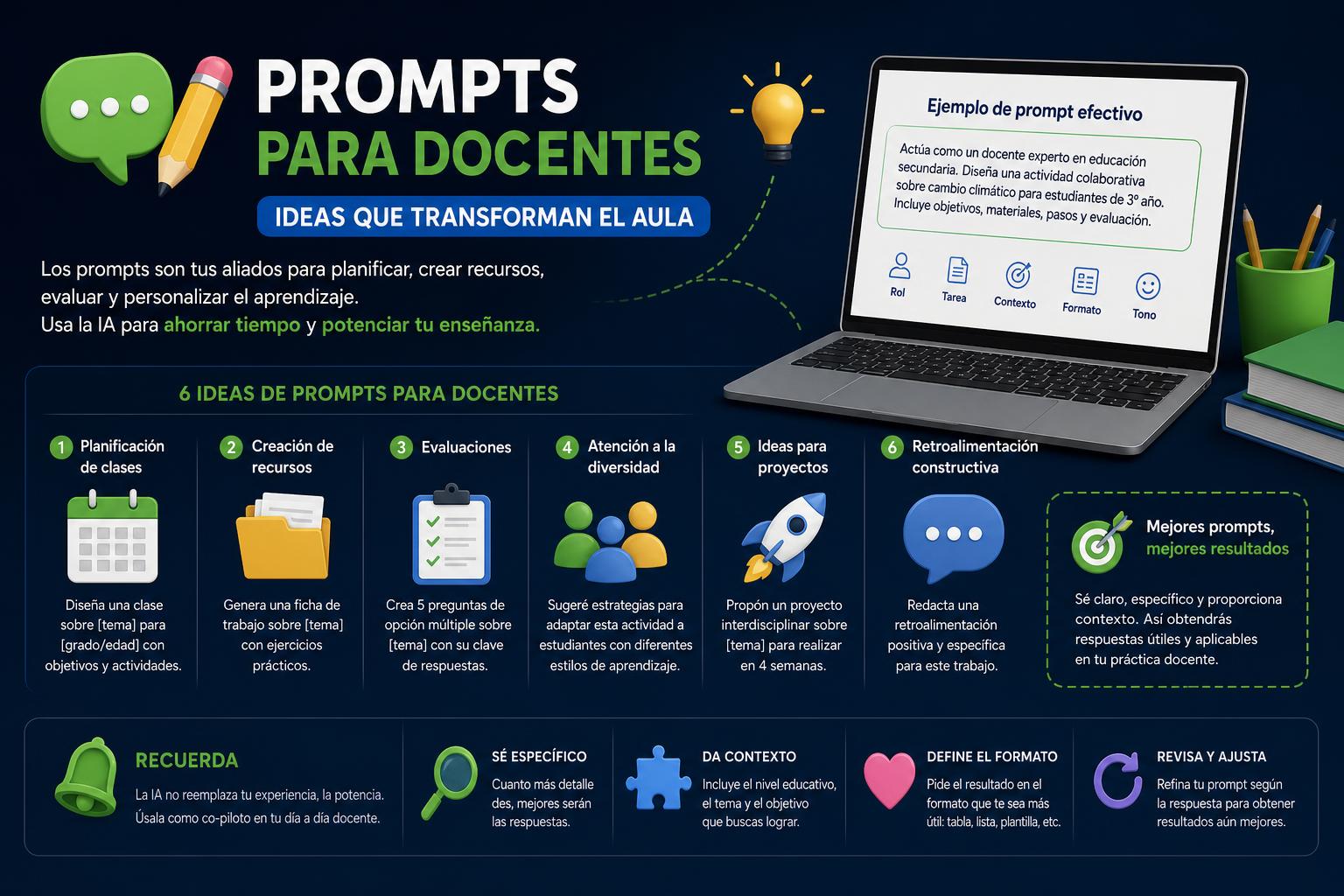
- A precise prompt saves time and personalizes teacher learning
- Structure, context, and clear objectives make all the difference in the results.
- Libraries of educational prompts and generators optimize classroom work
The arrival of artificial intelligence in classrooms has revolutionized how teachers plan, assess, and personalize their instruction. More and more teachers are looking for ways to optimize their time and improve student learning using AI tools such as ChatGPT, Claude, and many other available online options. But the real challenge lies in mastering the ability to communicate with these technologies through clear and precise instructions, known as "prompts."
Using effective prompts has become a key skill for obtaining useful responses from artificial intelligence, saving time, and tailoring learning to the specific characteristics of each group. A good prompt can transform a sea of repetitive work into personalized opportunities, innovative resources, and accurate assessments ready for classroom use. In this article, we will break down in detail what a prompt is, how to use it effectively in education, common mistakes, ready-to-copy examples, resources, tools, and everything else a teacher at any level needs to know to master this new digital skill.
What is a prompt and what is its use in education?
A prompt is a written instruction or set of instructions given to an artificial intelligence to obtain a specific response. It can range from a simple question, a task description, or a request to generate materials, to much more complex requests that specify the educational level, learning context, output format, or pedagogical objectives.
The key is that the clearer, more contextualized, and more precise the prompt, the better the AI's response will be . So, if we simply ask for "math activities," we'll get generic and poorly tailored results; but if we ask for "Generate three fraction activities for 5th grade, using manipulatives, lasting 20 minutes each, and focused on comprehension," the result will be much more useful and reusable.
This not only saves teachers time, but also allows them to personalize resources, adapt materials to different levels, and efficiently meet diverse educational needs , supporting their work and freeing up time for direct student attention. A well-designed prompt is the first step to maximizing the potential of AI in the classroom , making planning, resource creation, and assessment more efficient.
Keys to understanding how prompts work
The responses generated by artificial intelligence are based on four pillars that depend directly on the prompt design:
- The context that is offeredContextualized instruction, including details about the group, level, topic, or learning situation, helps AI to return much more refined proposals.
- The requested format and structureSpecifying the output type, for example, "rubric in table", "list of open questions", "presentation script", allows you to obtain directly applicable resources.
- The clarity of the taskAmbiguous requests generate ambiguous responses. The more clearly defined the objective of the request, the better the result.
- The pedagogical intentionIf the educational purpose or the skills sought are clarified, the AI will adjust its response, both in difficulty and depth, to fit the student's profile.
Why is a good prompt essential for teachers?
The quality of a prompt directly determines the usefulness of the response it generates. In an educational context, a teacher needs materials and activities that are not only well-written but also aligned with the curriculum, grade level, specific group, and learning objectives.
If the instruction is generic, the response will also be generic and will require extra effort to adapt it before use. The goal of mastering prompting is precisely to ensure that the resources returned by AI are almost ready to be applied in the classroom , requiring only minor personal adjustments. This translates to less time invested and higher quality learning.
From adaptations for students with specific needs, to the creation of materials by levels or the preparation of complete teaching units, prompts have become irreplaceable tools for the modern teaching day.
Basic structure of an effective prompt
Writing an effective prompt requires structured thinking; experts and top guides recommend using a four-part outline that is easy to remember and apply to any type of request to AI:
- Role: It tells the AI what role it should assume, for example, "Act as a primary school teacher specializing in science."
- Educational objective/task: Clearly state what you want to achieve. It could be "Design an introductory activity on photosynthesis" or "Prepare a rubric to evaluate written argumentation."
- Level and curricular area: Specify the specific stage, course, and subject matter. Example: "Second cycle of ESO, history, competency-based approach."
- Output format: Specify how you want to receive the answer, for example, "in table format", "list of steps", "with open questions".
This structure helps AI to understand not only what is being asked of it, but how and for whom , which greatly enhances the educational value of the response.
Tips and recommendations for writing good prompts
- Always define the educational objective: Before writing anything, be clear about whether you want to create activities, design a unit, prepare an assessment tool, or promote specific skills.
- Specify the educational level and area: The clearer the target audience, the more tailored the proposal will be. Consider the differences between early childhood education, primary education, secondary education, high school, and vocational training.
- Include the format or length of the response: Asking directly for a "rubric in a table of 10 items with 3 levels of achievement", for example, saves subsequent work.
- Add context about the group or needs identified: If students often confuse concepts, specify which ones in order to request remedial tasks or reinforcement.
- Request multiple alternatives or levels: This way you can choose the most appropriate resource or combine approaches.
- Use specific roles: Asking AI to act as an "innovative teacher", "educational advisor", or "diversification specialist" also enriches the results.
- Don't solve everything with AI: Choose prompts that generate reflection, guiding questions, debates, and critical thinking.
- Iterate and adjust: A good prompt is usually perfected over several rounds. Take advantage of iterative prompting to refine the response with instructions like "make it shorter," "raise the bar," or "include" Gamification».
Common mistakes when writing prompts in education
- Requesting overly open or ambiguous content. Example: “Explain photosynthesis to me” without specifying level or focus.
- Requesting activities or resources without indicating the academic level, objective, or context.
- Failure to verify the accuracy and suitability of the content produced by AI
- Using AI simply to do students' work, instead of using it as a tool that enhances learning.
- To depend entirely on what AI offers without filtering it or promoting subsequent analysis and reflection.
Types of prompts most useful for teachers: tasks, examples and templates
There are several types of tasks in a teacher's daily life where a good prompt makes all the difference:
1. Prompts for designing activities and teaching units
AI can greatly accelerate lesson planning and content organization thanks to well-formulated prompts. You can request anything from a unit plan structure by session—indicating topics, objectives, and tasks for each—to activity suggestions for developing specific skills.
Example:
"Act as a secondary school history teacher. Design a 5-session unit on the Renaissance for 2nd year of ESO (secondary school), including session objective, main activity, assessment task per session, and submit it in table format."
Variants: You can request the adaptation of the same unit for different levels, student profiles, or ask the AI to integrate Universal Design for Learning (UDL) principles, ensuring alternative ways of accessing the content.
DeepSeek in Education: Uses, Comparisons, and Practical Tips for the Classroom
2. Prompts for creating assessment instruments: rubrics and diagnostic tests
Rubrics and criteria lists allow for objective, transparent, and efficient evaluation.
Example:
"Create an assessment rubric for a 3rd year ESO written assignment on argumentation. Use 4 criteria (structure, arguments, spelling and presentation), with 3 levels of achievement, and clear descriptors. Answer in table format."
You can also order:
"Generate 10 diagnostic questions about equations for 1st year of Baccalaureate, ordered from least to most difficult."
o
"Write examples of constructive comments to correct texts with good structure but spelling errors."
3. Prompts for customizing materials and adaptations
The personalization of learning is significantly enhanced with prompts tailored to specific needs.
- "Explain the water cycle to a 5th grade student with reading difficulties using short sentences and simple vocabulary."
- "It identifies common mistakes when introducing first-degree equations in secondary school and suggests how to prevent them in the classroom."
- "It provides three open-ended questions for a debate on gender equality that encourage critical thinking."
Claude Code in Education: Transform your platform and multiply results with AI
4. Prompts for creating classroom resources
By specifying the format and level in detail, the AI can return everything from presentation scripts to graded activity lists, as well as review cards, visual materials ( concept maps , descriptions for flashcards), debates, problem situations, case studies, etc.
5. Prompts for teacher preparation and organization
They are useful for optimizing time management , creating weekly plans, organizing activities with methodological variety (cooperative, gamification, interdisciplinary projects), or even asking for suggestions for classroom management and motivation techniques.
Step-by-step guide to creating your own educational prompt
- Think about the ultimate goal: Do you want to generate content, assess, personalize learning, and foster critical thinking?
- Select the level, subject, and group type.
- Define the format and length of the resource you expect.
- Request variations, alternatives, or leveled activities if needed.
- Don't forget to include context about your needs, teaching style, or common student difficulties.
- Review the first answer and ask the AI to adjust it according to the nuances you detect after reading it. You can ask him to
– shorten or lengthen the answer,
– adapt for rural or urban contexts,
– strengthen the gender perspective,
– combine two or more methodologies,
– customize the level of difficulty.
Ready-to-copy (and customize) prompt templates
- "Design a competency-based activity for 1st year of ESO (secondary school) in mathematics on proportionality, with specific evaluation criteria and differentiation for students with difficulties."
- "Create a rubric in table format to evaluate a research project on biotechnology in the second year of high school."
- "Generate questions that allow for the analysis of the veracity of a news item in 3rd year of ESO (Compulsory Secondary Education)."
- "Simplify this text for students with ASD using simple sentences, visual supports, and accessible language."
- "Help me develop a teaching unit based on cooperative learning with detailed sessions, methodology, and resources."
Tools for generating and organizing educational prompts
There are various platforms and tools designed for teachers who want to get the most out of artificial intelligence.
- Founderz AI Business SchoolIt offers a practical guide, ready-to-copy templates, and a prompt generator that allows you to choose the level, subject, and resource type to obtain the listed direct instruction.
- PromptEducativo.es: A fast and simple generator, in which you can select the characteristics of the center, group, educational level, specialty, and the type of evaluation material or document you want.
- INTEF – ProyectoEDIATutorials and ready-to-use prompt templates that can be adapted to different chatbots, free and adjustable to each teacher's needs.
- General platforms such as ChatGPT or Claude, which offer total flexibility to design from scratch and test all kinds of prompts after a few iterations.
Many teachers combine quick generators for standard tasks with custom prompts for more specific situations . This achieves speed and customization without sacrificing control over the outcome.
How to create your own teacher prompt library and why it's useful
Having your own collection of prompts tailored to your style and needs saves a lot of time in weekly lesson planning. You can organize your best prompts by task: activity design, assessments, personalization, addressing diversity, visual resources, feedback, etc. This way, you'll only need to copy and adjust minor details each time you repeat a structure.
In addition, some educational projects highlight the importance of building their own repository, which functions as a base template for new situations, changes of topic, changes of level or adaptations to specific students.
AI as a support, not a substitute: ethics and limits
Artificial intelligence is a tool for saving time and streamlining routine tasks, but it should never replace the teacher's pedagogical judgment and decision-making. AI can suggest proposals, offer feedback, and generate drafts or resources, but it is the teacher's responsibility to review, edit, and validate both the pedagogical suitability and the accuracy and appropriateness of the content for the group.
Furthermore, there is a critical responsibility to protect students' personal data . Names, grades, or other sensitive information should never be entered into general-purpose AI platforms. All cases and examples must be anonymized. Always consult the policies of your school or educational authority beforehand.
Best practices for the safe and pedagogical use of AI in education
- Review all the information before applying it in the classroom.
- Always seek adaptation to your group and context.
- Use prompts to encourage critical thinking and active student participation.
- Keep your own prompt library organized and update it regularly.
- Avoid entrusting AI with sensitive data or responsibilities exclusive to teacher evaluation.
Frequently asked questions about prompts and their use in teaching
- Does the same prompt work for different educational stages? Yes, it is enough to change the level and subject in the instruction, while maintaining the same template structure.
- Is it safe to use AI with student data? Personal data should not be entered into general tools; always use anonymous descriptions and ask for permission or information about the center's guidelines.
- What type of prompts work best? Those that indicate role, clear objective, level, context and format; and those that offer options according to need (skills, adaptations, varied resources).
- Can AI replace teachers? No. AI is a support tool to free up time and automate tasks, but pedagogical decisions, critical analysis, and the educational relationship are the sole responsibility of the teacher.