
- The points in ClassDojo They reinforce behaviors and skills to improve school and family life.
- Points can be added, removed, customized, or reset both in the classroom and at home, facilitating coordination between teachers and families.
- There are options to show or hide records in family reports and to redeem points for predefined rewards.
Today, ClassDojo has become one of the most popular educational tools for managing student behavior and motivation both in the classroom and at home. You've probably heard about the points that can be awarded or deducted based on student behavior, but have you ever wondered how to remove an incorrectly awarded point or how to manage the point system from home? These are common questions for both teachers and families. If you're interested in fully understanding how point management works in ClassDojo , and especially how to delete or readjust points after a mistake, keep reading!
In this article, we'll explore all the options related to ClassDojo points : from how to remove a point on the official platform to tips for managing your children's experience at home. We'll also draw on information from the official ClassDojo website and its help center, as well as other relevant sources. Everything will be explained simply, with a clear structure, practical examples, and advice based on both teaching and family experience.
What are points used for in ClassDojo?
The most important thing you should know is that Points in ClassDojo are a visual and simple way to give feedback on student behavior and skills.Each point assigned is intended to motivate, reward progress, or correct undesirable behaviors, both in the school and family environment.
A teacher who uses the system of ClassDojo points He said: “Looking at the points and having those talks has made me not only a better teacher, but a better human being.”This system not only provides positive or negative reinforcement, but also encourages joint reflection among teachers, students, and families.
Who can give and take away points?
The points system in ClassDojo is designed to be managed primarily by teachers.However, the platform allows that Families can also award or deduct points in the "Class at Home" modalitythus facilitating that learning and behavior correction continue outside the classroom.
With this approach, parents can continue to motivate their children or correct behavior in coordination with the teachers. It is always essential that there be communication between the school and the family so that the use of the points is consistent and constructive.
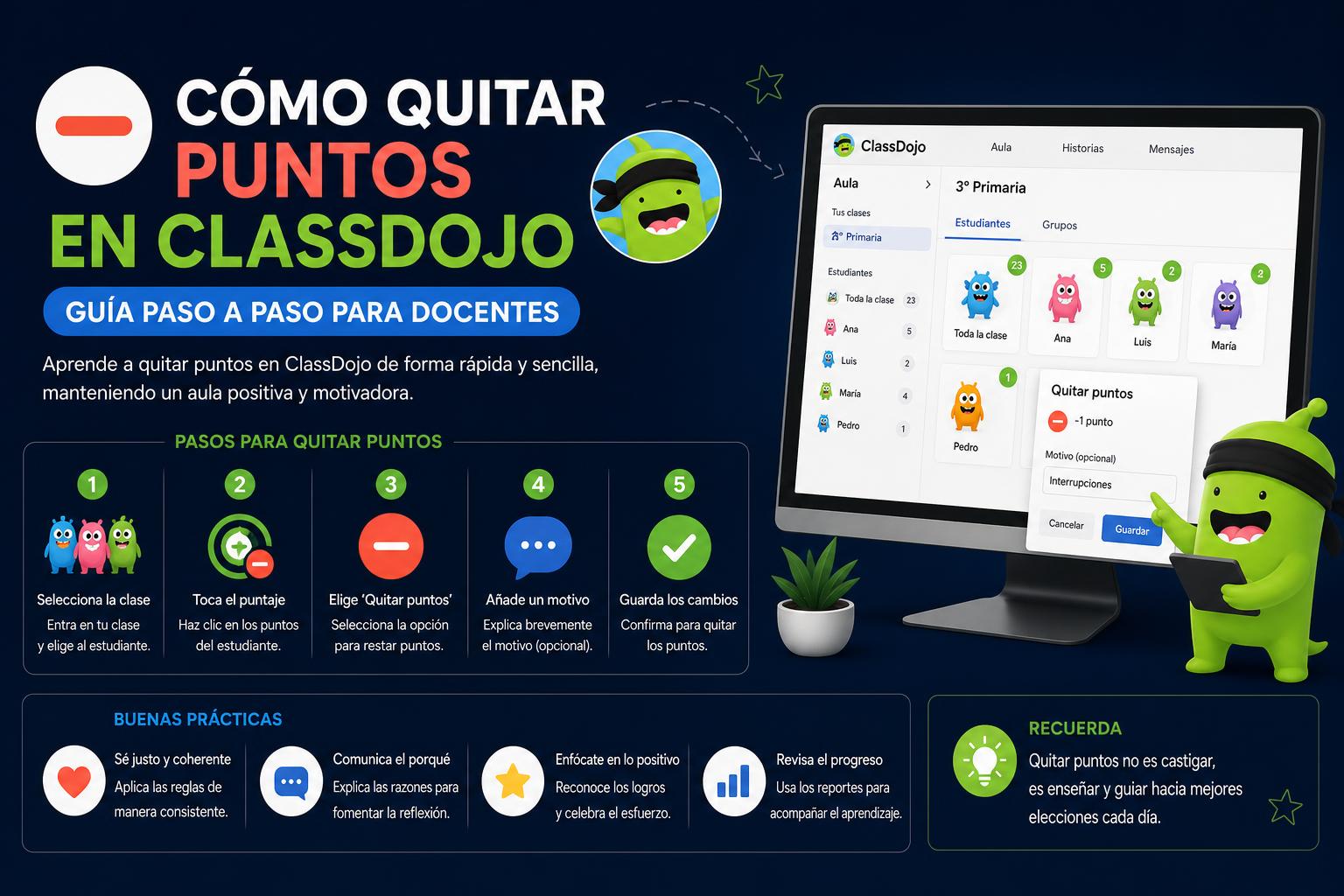
How to remove points in ClassDojo from the official platform
Sometimes, you might have awarded a point by mistake or need to remove it for other reasons. ClassDojo offers several guides in its official Help Center , but often the information is brief or lacks detail, so here we explain the process step by step.
Undo a point from the teacher's account
- Access your account on the website or app of ClassDojo.
- Enter your class and select the corresponding student.
- Click on the point you want to delete.
- Depending on the type of point, you will see the option to undo or delete the assignment. If you have made a mistake, simply press the function. "undo" usually located next to the recent points log.
- Confirm the deletion so that the point is no longer registered.
It's important to note that this process may vary slightly depending on whether you're using the mobile version or the web version . If you can't find the undo option, be sure to update the app.
Delete a given point at home
If the family has awarded a point using the ClassDojo from home option, there is also a way to reverse it:
- Log in to your ClassDojo family session.
- Go to your son or daughter's profile.
- Locate the history of points awarded "at home".
- Next to the registration you will find the option to delete o undo the awarded pointClick and confirm the action.
Syncing with the teacher's account helps ensure there is always common control over the points received, avoiding contradictions between what happens in class and at home.
Customization, editing, and advanced point management
One of the features most valued by teachers is the ability to customize the skills and actions that can earn points . This allows you to adapt the system to your class's norms and values, since not all behaviors carry the same weight depending on the context.
How to customize skills and edit points
- From your class settings tab within ClassDojoYou can add new skills or modify existing ones.
- Each skill can be configured to award a specific type of point (positive, negative, extra boost, etc.).
- When editing an existing skill, you decide whether to give extra points, subtract points, or leave it as is.
- In this way, the system does not become a simple marker of behaviors, but rather encourages collective or individual goals adapted to the group.
Editing of recorded points
At some point, you may need to modify the point record (for example, if a point was awarded based on a misunderstanding or if the student later demonstrates appropriate behavior). To do this:
- Look for the historical record of points within the student's profile.
- The option to edit or delete specific records will appear.
- Whenever you make changes, it is advisable to record the reason to facilitate communication with families.
Transparency in points management is key to maintaining a relationship of trust and avoiding misunderstandings with students and their parents.
Show or hide points in family reports
In ClassDojo, points reports for families can be customized to show certain information or keep some records hidden, if necessary.
- Access the reporting options within your class settings.
- Select whether you want families to see all points, only positive ones, or to hide negative records.
This option is especially useful if you have students with emotional support needs or if you want to focus feedback on constructive aspects, without making negative comparisons.
Reset class or student points
At the start of a new course, term, or simply to "reset" the motivational scoreboard, the ClassDojo platform allows you to reset the point bubbles for both the entire class and individual students. This way, everyone starts from scratch and avoids perpetuating labels.
- Open your class options within the application.
- Look for the “reset points” function in the list of options.
- You can choose to reset all points together or one by one.
- The platform may ask you for confirmation before executing the action to avoid unintentional errors.
- After the reset, new goals or challenges can be set aligned with the dynamics of the class.
Redeeming points for rewards
Another common use of the ClassDojo points system is exchanging them for reinforcements and prizes, something that especially motivates students.
- From the "redemption" section on the ClassDojo website, you can define which rewards are available and how the exchange is carried out.
- Rewards can be material (small prizes), privileges, or special activities.
- The system helps students manage their goals, deciding when to "spend" their points and when to wait for a bigger reward.
Of course, all exchanges must always be approved and managed by the teaching staff , thus avoiding possible confusion and ensuring that the rewards promote a positive classroom climate.
Frequently asked questions and extra tips on points management
In addition to the above explanation, many questions arise regarding the daily use of this ClassDojo feature . Below, we've compiled some practical tips and answers to common questions that may arise for both families and teachers:
What happens if I accidentally delete a period?
If you delete a point you intended to keep, remember that ClassDojo keeps a record of recent actions and usually allows you to undo recent changes. If the error is older, contact support for assistance.
Can I completely hide the negative points?
Yes : In the report settings, you can decide what information each tutor or family sees. This allows you to focus feedback on the positive, helping to maintain student motivation.
Do the points look the same in the app and on the web?
The design may differ slightly between the mobile app and the web version of ClassDojo , but the point tracking, history, and deletion options are the same.
Can students see their historical records?
Students typically view their own points history on their profile, which encourages reflection on their progress and goals. Families, on the other hand, only have access to the information that teachers choose to display.
Can multiple points be reversed at once?
Currently, each modification of points must be done one by one to ensure control and customization of the process.
Do points awarded at home count the same as those awarded at school?
This is decided by each educational center: the system is designed to combine efforts and provide coherence, but it can be configured so that the weight or the calculation of points depends on who has awarded them.
Pedagogical uses of ClassDojo points
The points system is much more than just a numerical record. When implemented correctly, it helps develop values such as responsibility, self-esteem, and self-control in students . Furthermore, it strengthens communication between families and the school and allows for the identification of areas for improvement, both individually and as a group.
- Create weekly challenges for the class.
- It promotes student self-management and responsibility.
- It promotes a culture of positive reinforcement, helping teachers and families to guide behavior constructively.
As students see how they accumulate points and can redeem them, intrinsic motivation is fostered. Furthermore, if a mistake is made with the points, the process of correcting it (delete or subtract points correctly) becomes a powerful educational opportunity to work on emotional management and honesty.
Common mistakes and how to avoid them
Even with intuitive systems like ClassDojo, it's easy to make small mistakes, such as accidentally awarding or deducting a point, or using a misconfigured skill . Here are some tips to avoid these situations:
- Periodically review the skill and point type settings in your class.
- It shares with families both the logic for assigning points and the rules for deleting or "undoing".
- Before deleting points, carefully check your history to avoid deleting more than necessary.
- Use the "reset" function only when changing cycles or when agreed upon by the teaching group.
This way you ensure a consistent experience for everyone and enhance the educational value of the points system.
If you have specific questions about your particular situation, the best source of information is the [link to relevant resource], where you'll find guides on how to undo a point, how to delete points awarded at home , how to edit skills and points , or how to reset points . You can also find inspiration in real-life experiences and explanatory videos on social media and YouTube, although for specific details, the official channel is usually more reliable.
Using ClassDojo and its points system effectively greatly simplifies educational work both inside and outside the classroom. The options to add, remove, and reset points are designed to ensure that no mistake is irreversible and that progress can always be corrected or adapted to each context. Thanks to this personalization, families and teachers can work together on positive reinforcement, making point management a tool that supports students' personal growth.
ClassDojo: The definitive guide to the educational platform that is transforming the classroom