
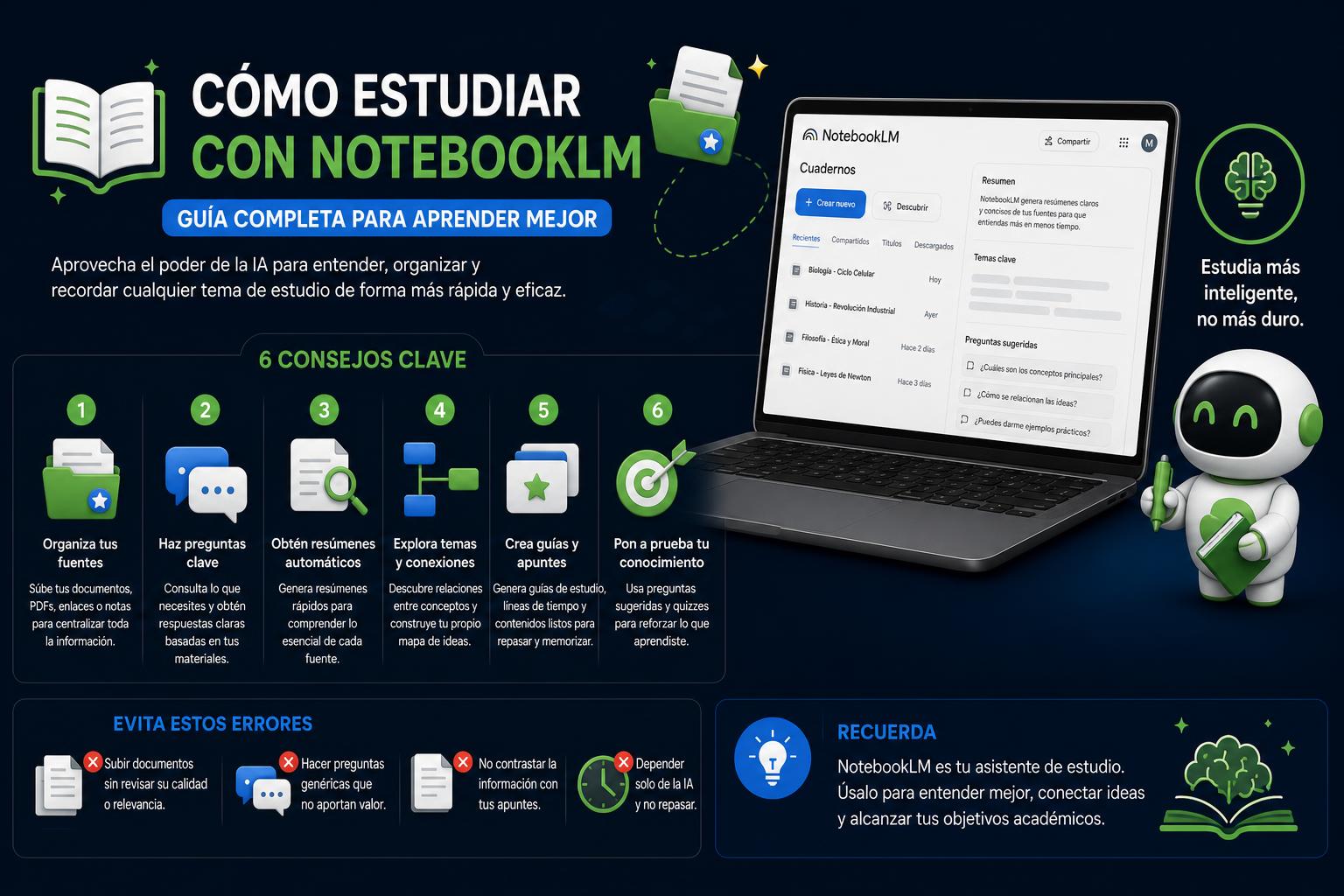
- NotebookLM It allows you to centralize, organize, and personalize your study using AI and your own materials.
- A clear structure of notebooks and sources optimizes the accuracy of summaries, outlines, audios, and tests.
- By applying detailed prompts, weekly routines, and avoiding common mistakes, the tool multiplies your efficiency and effectiveness when preparing any subject.
The arrival of Google's NotebookLM in the educational world has revolutionized how we organize, learn, and review large amounts of information. Unlike other artificial intelligence tools, its strength lies in personalizing study based on your own documents, allowing you to centralize everything you need for exams, university, high school, or any situation where you're required to perform at your best.
In this guide, we break down, step by step, how to get real and practical use out of NotebookLM for studying, going beyond simple summaries and transforming each study session into a smart, efficient, and personalized experience. Whether you're a university student or a seasoned exam candidate, we detail methods, tricks, proven prompts, and weekly routines so you can leverage Google's AI as a true study partner, integrating all the advanced features, outlines, mind maps, and interactive materials you can create. Get ready to discover a new way to organize your learning, avoid common mistakes, and take a leap forward in your academic performance.
Why is NotebookLM the indispensable tool for studying?
NotebookLM stands out because it functions as a digital assistant capable of analyzing only what you choose, whether it's notes, PDFs, videos, or audio recordings from class. Unlike typical chatbots that mix responses from across the web and can be confusing, this tool focuses entirely on the files and data you upload , reducing errors and personalizing explanations. Google officially defines it as a "research assistant" adapted to diverse profiles such as university students, researchers, content creators, or anyone who has to manage a mountain of information. You can access it from its official website, NotebookLM for Students.
This isn't about AI studying for you, but about making the process much more efficient . You can use Gemini's AI (the engine behind NotebookLM) to organize your own sources, cross-reference notes, and transform scattered materials into clear summaries, study guides, review audio, or automatic tests tailored to what's actually on your exam.
What materials and sources can you use in NotebookLM?
One of the great advantages of NotebookLM is its versatility in accepting all types of fonts:
- Notes in PDF formatWord or Google Docs, both those generated by you and those provided by teachers.
- Manuals, official syllabi and books, loaded by chapters or sections to avoid overloading the system.
- Presentations of class in PowerPoint or PDF.
- Transcripts of YouTube videos and audio recordings of conferences or classes, allowing you to import essential information from long presentations without wasting time transcribing by hand.
- Images, audio, web links and multimedia material related to the syllabus.
- Exams from previous years, completed questionnaires and corrected answers.
- Laws, specific regulations, and any relevant text documents.
The key advice? Don't upload absolutely everything at once. It's essential to maintain order and clarity from the start, creating a notebook for each subject or, in the case of competitive exams, for each major thematic area. This way, the AI will respond accurately, and you can request summaries, outlines, or audio recordings of exactly the material you need to review, avoiding mix-ups and confusion.
The best way to structure your notebooks and study resources
Many users make the mistake of creating a single giant notebook and throwing all their materials into it. It's tempting, but this method ends up making management difficult and results in overly general responses or causes the AI to get lost. The key is organization:
- For university students: Ideally, you should have one notebook per subject. If a subject includes a very large textbook, consider creating a separate notebook just for that book. Inside, add topics, presentations, recordings, and any other materials relevant to that specific subject.
- For those facing opposition: The most effective approach is to create a notebook for each section of the syllabus. For example: Constitution, Administrative Law, Psychometric Tests, Specific Legislation, Practical Scenarios, etc. This way, each section contains only the material for that area, making it much easier to focus on reviewing.
Extra tip: Use clear and separate names for weeks, units, or topics. Don't mix material you don't need to study yet. When you move on to a new topic, upload only that new section and create a final review notebook exclusively with the material that will be on the exam.
What types of output or results can NotebookLM generate?
NotebookLM is more than just a summary tool. In fact, its strength lies in its ability to adapt to any learning style and stage of study. Among its key features are:
- Summary Audio Overview: It transforms any topic or section into an AI-generated interactive podcast, ideal for reviewing on the go.
- Video summaries: If the source is a YouTube video, it produces a visual summary and highlights the key points without needing to watch the entire video.
- Questionnaires and tests: Generate multiple choice, essay, true/false questions or vocabulary lists directly from your texts and notes.
- Executive reports: Create formal, organized summaries ready to be reviewed by someone who has not read the full sources.
- Mental maps: Obtain hierarchical schemes that connect topics, subtopics, and relationships between concepts, even if they are not visual drawings but well-structured lists.
- Flashcards: specific question-and-answer pairs to memorize definitions, dates, or difficult facts.
- Review presentations: Suggested structure for presenting a topic in organized slides, ideal for papers and oral presentations.
- Infographics: Visual summaries that facilitate a quick review of essential data.
These results can be requested through suggestions from the tool itself or by explicitly asking for them using specific prompts (instructions). In each case, the clearer you are about the objective of the result, the better the AI will tailor its responses to what you really need (understanding, memorizing, comparing, organizing, or reviewing).
Practical tips and effective prompts for studying with NotebookLM
The magic of NotebookLM happens when you know how to ask it for what you're looking for, using clear prompts tailored to each situation. Here are real-world examples and tips for effective prompting :
- To compress the essential information: “Summarize this lesson by highlighting key concepts, definitions, useful examples, and possible exam questions. Relate what has been explained to topics already studied in your notebook.”
- To transform a long chapter into a personalized audio file: “Create an audio summary focused solely on the selected chapter. At the beginning, state the exact chapter number and name, then clearly explain the concepts, using language appropriate for someone studying the topic for the first time and helping to connect the smaller ideas to the overall picture.”
- For candidates with complex topics: “Create a review audio with main definitions, key articles, differences between concepts that are often confused in the opposition and brief examples.”
- For differentiated study guides: “Create a study guide for this topic with four sections: essential concepts, ideas to understand, facts to memorize, and review questions. Please use only information from the sources.”
- To segment the material into levels of difficulty: “Divide this topic into basic level (the essentials to understand it), intermediate level (what I need to know to explain it well) and exam level (the complex details that are usually asked).”
- For challenging multiple-choice questions: “Create 25 multiple-choice questions with four options, one correct answer, and a brief explanation after each answer. Focus on key concepts and common exam mistakes.”
- For open-ended university questions: “Write 10 essay questions that could appear on an exam and indicate for each one the points that a perfect answer should address.”
- For review and self-assessment routines: "Generate a review test based only on the questions I got wrong last time and create a detailed explanation for each mistake."
- To optimize mind maps: “Explain in detail a specific branch of the mind map and give a simple example. Or turn the map into a hierarchical outline with key points.”
- To prepare presentations: “Prepare a 10-minute presentation on this topic with main ideas, examples, and no unnecessary background information.”
- To test your knowledge: "Give me a list of typical exam mistakes on this topic and explain them so I can avoid them in the future."
- To compare information from different sources: “Compare these two documents and tell me what they have in common, what they contradict, and what parts are essential for review.”
The more specific the prompt, the better and more useful the response will be. Always specify why you need the information and what you hope to achieve.
How to create an unbeatable weekly study routine with NotebookLM
The biggest leap in quality comes when you incorporate NotebookLM into your weekly routine, adapting the materials and exercises to each phase of your studies. Consistency and gradual progress are key.
- After each class, upload new notes, readings, and presentations to the corresponding notebook.
- Ask the AI for a clear summary of the content viewed and a list of key concepts.
- Request 10 interactive questions to self-assess after each block.
- At the end of the week, generate a review audio recording with all the points discussed.
- Before each exam, create a study guide with the accumulated topics and, if possible, review tests focused on the errors or doubts that still remain.
For candidates facing extremely long syllabi, the routine may be more intensive:
- Each week, upload the corresponding topic and ask for detailed explanations by blocks.
- Generate diagrams, flashcards, and special tests focused on weak points.
- Upload failed questions or exams with errors, so that the AI can prepare reviews and analysis of patterns that you tend to repeat.
- At the end of the week, generate personalized audio recordings to review while doing other tasks, and review what you've studied with new, more complex questions.
In all cases, consistency always wins over cramming at the last minute. By using NotebookLM a little each week, you'll arrive at every exam or test well above average.
Common mistakes to avoid when using NotebookLM in the studio
Like any powerful tool, NotebookLM can create a false sense of security if not used intelligently. Common mistakes include:
- Uploading too many documents without organization makes reviewing them difficult and overwhelms the AI with irrelevant information.
- Requesting only general summaries, without specifying what the material will be used for.
- Do not check the generated answers against the original content; remember that AI can make mistakes if the source is confusing or incomplete.
- Limiting oneself to studying only with audio, forgetting to read, write and practice with traditional materials.
- Not practicing active remediation: If you don't do review questions or self-assessment tests, you're missing out on one of NotebookLM's most powerful features.
- Mixing topics that are not included together in the exam or do not belong to the same unit of study.
- Relying on AI to decide what is included in the exam instead of using it as a reinforcement tool.
AI should serve your study method, not replace it. Use NotebookLM to organize, clarify, practice, and review, but never as a complete substitute for traditional memorization and deep understanding techniques.
Unique advantages and differentiating features of NotebookLM compared to other assistants
- Answer based solely on your own documents: The AI model only knows what you give it. External noise and the so-called 'hallucinations' of conventional artificial intelligence are eliminated.
- Immediate citation and traceability: Each answer will include exact references to the original source. Clicking on the citation number will show you the specific paragraph where the information came from, reducing misinterpretations and facilitating fact-checking.
- Absolute versatility: You can combine multiple types of documents (text, audio, video, images) and consult concepts by cross-referencing all that information.
- Editing and creating new content: You can transform your notes, answers, and annotations into outlines, video scripts, presentations, or even simple apps that help you visualize complex topics.
- Direct integration with Google Gemini: From the Gemini mobile and web app, you can connect your NotebookLM notebooks as trusted sources, using your own materials in searches and conversations with AI.
Practical examples: how students and candidates use NotebookLM
Within NotebookLM, each type of student or professional can adapt the features to their needs. Let's look at some prominent examples:
- University students: They use the tool to upload notes after each class, request automatic quizzes, convert materials into audio files, list key concepts, and prepare oral presentations based on the syllabus. It is especially useful for reviewing before weekly or final exams.
- Opponents: They divide their syllabus into large blocks (for example, "Constitution", "Specific Legislation", etc.) and generate tests following the official model, create review routines, analyze failed questions and request revision plans adapted to the weakest concepts.
- Researchers and professionals: They upload articles, excerpts from laws, or transcripts of meetings to compare information, create to-do lists, and detect contradictions between regulations or documents.
- Writers and content creators: They transform threads of ideas into scripts for videos, examine inconsistencies between chapters of a book, or generate visual schemes to plan their work.
In each case, the key is to adapt the use of NotebookLM to the specific objectives: understanding, memorizing, comparing, presenting or self-evaluating.
How to leverage Gemini integration for an even more flexible studio
Google recently added the ability to incorporate notebooks created in NotebookLM directly into Gemini app queries. This combines the full power of Google's AI search with your own notes and materials, generating well-founded answers based on both external databases and your personalized work.
The setup is very simple: from the Gemini chat window, click the "+" icon, select NotebookLM, and choose the notebooks you want to use as a source. From then on, your questions will include data from your own documents, preventing generic or incorrect answers and allowing you to compare the results with your study materials.
This integration system ensures that none of your previous work in gathering information is wasted. Everything you've organized, edited, and adapted in NotebookLM can be used in an even more dynamic and flexible environment, even from your mobile phone or tablet.
The importance of source quality and other essential tips
The quality of your documents matters much more than it might seem at first glance. If you upload poorly scanned PDFs, disorganized documents, or incomplete notes, the AI will only be able to give you mediocre and potentially inaccurate results. Before uploading any file:
- Make sure the text is selectable and well-structured.
- Avoid carrying materials that are not on the exam or that you don't need to study immediately.
- If you have very long documents, take care of cutting them into chapters or sections.
- Always organize file names to facilitate quick searches.
- Prioritize uploading to NotebookLM only what will truly help you: key notes, summaries written by professors, real exams from previous years, or bibliography selected
The accuracy of AI depends entirely on the quality of the sources you provide. First and foremost, ensure your documents are organized and clean.