
- Discover the most effective positions, techniques, and tricks for typing quickly and without errors.
- Find the best free exercises, tests, and platforms to practice typing online.
- Learn about motivational aspects, ideal frequency, and methods to acquire total keyboard mastery.
Touch typing has gone from being an exclusively office skill to an essential ability in everyday digital life. Improving your typing speed and accuracy can make all the difference in your work performance, academic performance, and even your leisure time at the computer. If you've always wanted to learn touch typing or reach a professional level without looking at the keyboard, here you'll find all the methods, tips, and resources you need.
Today, online platforms, interactive exercises, and expert advice make learning easier, transforming what was once a monotonous process into something enjoyable and motivating. In this guide, we'll show you how to learn touch typing step by step, review the best techniques, reveal free resources, and help you choose the most effective method for your needs. Get ready to type like never before!
Why learn typing?
Mastering touch typing goes far beyond simply typing quickly; it involves developing the ability to type long texts without looking, accurately, and effortlessly. These advantages translate into time saved, less fatigue, fewer errors, and a healthier posture at the computer. Furthermore, knowing how to touch allows you to focus on what you're typing instead of searching for keys, which is essential for both students and professionals.
Key concepts and fundamentals of typing
Learning to touch is based on conscious repetition and muscle memorization. Your fingers must develop the ability to find each key automatically, without needing to look at the keyboard or think about its position. This process may feel awkward at first , especially if you have previous habits, but regular practice will eventually make it flow naturally and comfortably.
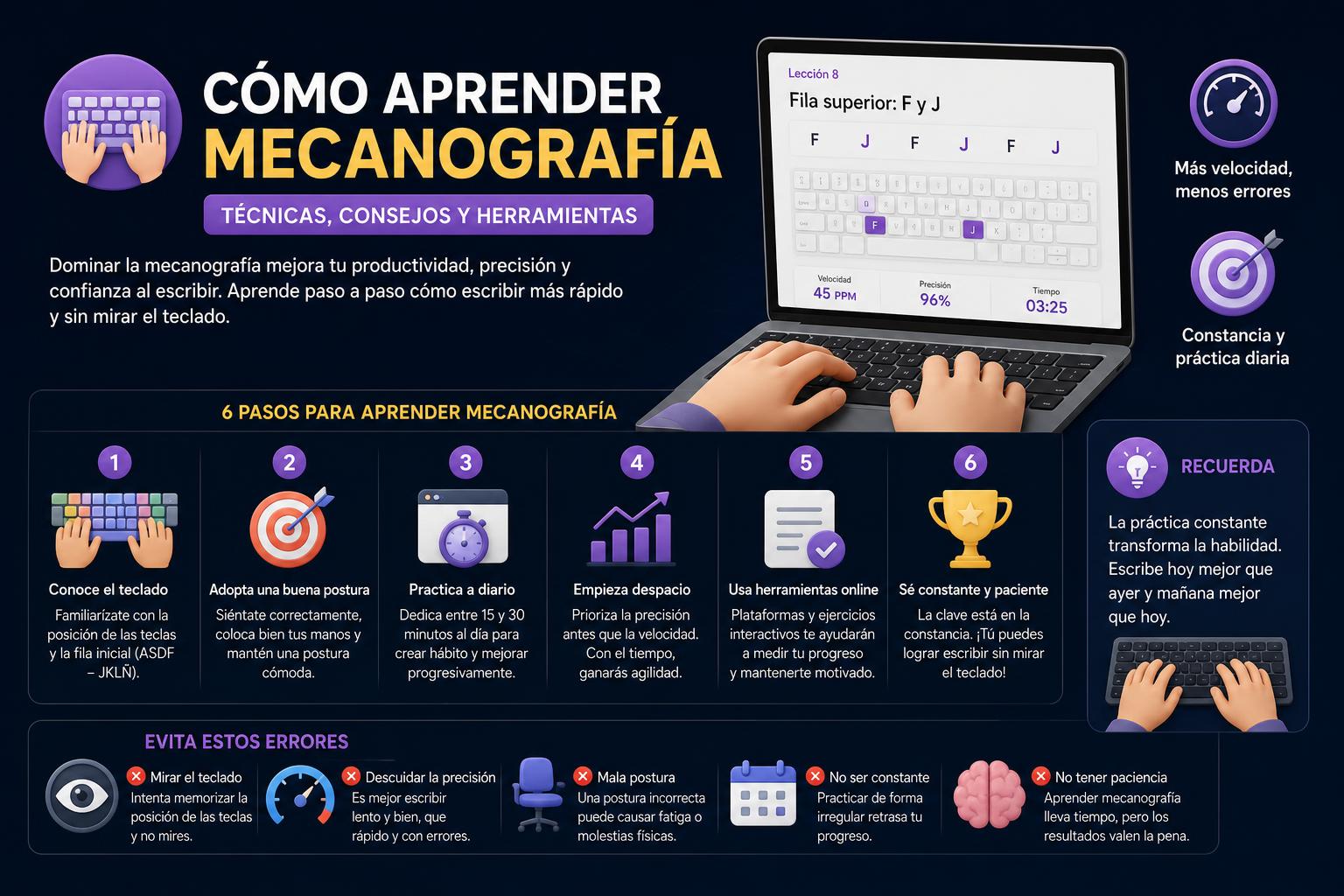
One of the most important points is the starting position of your fingers: the middle keys—known as the 'home row'—are A, S, D, F for the left hand and J, K, L, Ñ for the right. You should always begin each exercise from this position. The F and J keys usually have a small mark to help you locate them without looking.
Finger placement and proper body posture
As with any repetitive activity, posture matters. Sitting properly at your keyboard reduces the risk of muscle strain and improves accuracy. We recommend:
- Stand up straight in front of the keyboard, with relaxed hands and wrists.
- Bend your fingers slightly. and place them on the home row (A, S, D, F – J, K, L, Ñ), so that each finger is ready to travel only to certain assigned keys.
- hands should be parallel the keyboard and forearms can rest on the table.
- The thumb is used for the space barusing whichever hand feels most comfortable.
- For capital letters, use the pinky finger opposite the finger that presses the other key (If you press A with your left pinky, the capital letter will be with your right).
Techniques and practical tips for learning to type from scratch
- Pronounce each letter out loud as you type it. This trick helps your brain create a connection between the letter, the finger movement, and the sound, accelerating muscle and auditory memory.
- Repeat each exercise or lesson at least three times per week. Consistency trumps quantity: doing short, regular sessions will make you learn much faster than long, sporadic sessions.
- Maintain a steady writing pace. Trying to go fast from the start leads to mistakes, slows down learning, and can frustrate you. It's better to focus on accuracy first.
- Don't try to pick up speed right away. Speed comes from practice and a solid grasp of the correct technique. If you're precise, speed will come naturally.
- Choose courses and platforms that are fun and motivating. There are options with games, achievements, levels, and rewards that help maintain interest and long-term engagement.
- Forget your old method of typing with two fingersAlthough at first it may seem slower to use all your fingers, once you master the arrangement you will reach unprecedented speeds.
- Regularity matters more than the amount of time spent each day. It is preferable to practice for 10 minutes every day rather than for an hour only once a week.
Typing exercises: how to structure practice
Exercises are the key to learning. The classic structure consists of:
- Exercises with individual letters: We work group by group (for example, first the middle row, then the upper/lower rows), training the position and basic movements of each finger.
- Exercises with sample texts: By moving on to complete words and phrases, you put what you've learned into practice, improving fluency and getting your brain used to real writing.
- Custom exercises: Some programs allow you to insert your own text to practice with phrases or paragraphs related to your area of work or study.
- Speed and accuracy test: Performing these tests periodically allows you to measure your progress and adjust your practice according to your results.
Platforms, online resources and games for learning to type
Today, you have access to a wide variety of free websites and apps that cater to both children and adults, different experience levels, and various keyboard layouts. Here's a look at some of the most interesting options, all easy to use and focused on the student's actual progress.
Free Online Typing Classes
It offers practical exercises to progress from the basics to complete texts , with a free test to measure your progress . It allows you to work with different keyboard rows, switch between letters, words, or phrases, and select your preferred keyboard layout (QWERTY, AZERTY, DVORAK, etc.). The content is accessible to everyone and requires no registration; all you need is the desire to improve every day.
AgileFingers
This platform includes exercises, texts, games, and quizzes, storing your progress and allowing students, teachers, and individual users to track your development . Teachers can set accuracy and speed thresholds, making it ideal for educational settings. It measures accuracy on both the first attempt and the final result , providing more information about the errors made and corrected.
rattype
Ratatype offers a didactic approach where color-coding and a keyboard layout help you understand which finger to press each key. It clearly explains key positions, the importance of always returning to the home row , and details tricks like using your thumb for the space bar and your opposite pinky for Shift. It provides lessons, practice exercises, speed tests, and frequently asked questions that answer the most common queries.
[related url=»https://www.orienta21.com/que-es-typingclub/»]
Edclub
A classic in online learning, Edclub features over 500 lessons accompanied by videos, games, virtual handbooks, and dynamic activities. Designed especially for children, it uses a system of levels, badges, and stars as incentives, tracking progress and encouraging perseverance until keyboard mastery is achieved. It's ideal for those seeking extra motivation and a safe environment to learn from scratch.
Typing.com
Another widely used global platform, available in Spanish and other languages, offers progressive exercises, detailed statistics, challenges, and games, adapting even to students of different ages. It's ideal for those seeking a detailed progress history and the ability to practice from any internet-enabled device.
Recommended platforms and games for children
For younger children, there are specific platforms—such as edclub , Vedoque, and Typeracer —that transform practice into games and competitive mini-cases. Vedoque introduces touch typing through six lessons with motivating games and various types of quizzes to reinforce learning. Typeracer allows players to compete online against others by typing famous quotes, adding a key fun and social element.
Personalize your learning: keyboard layouts and tests
Not all keyboards are the same; depending on your country, you might be using QWERTY, AZERTY, QWERTZ, or even advanced alternatives like Dvorak or Colemak. Many online courses allow you to choose your keyboard layout, adapting the exercises and tests to the layout you're used to or want to learn.
Regular speed and accuracy tests are essential: these measurements will tell you if you need to repractice certain letters, hands, or combinations, or if you're ready to move on to the next level. At first, don't obsess over speed: focus on avoiding mistakes and strive for steady, motivating progress.
Stay motivated and practice with purpose
Motivation is the fuel for sustained learning. Many platforms understand this and include achievements, badges, rankings, and daily challenges. Using these resources helps you stay on track and maintain interest, especially at the beginning when progress can be slower.
Consistency always trumps intensity. It's better to practice consistently for 10 minutes a day than for an extended period once a month. Furthermore, setting realistic goals (such as reducing the number of errors per minute or leveling up on your favorite platform) can be very helpful in maintaining consistency.
Frequently asked questions about learning to type
- How long will it take me to learn to type? The pace varies depending on the frequency, consistency, and method chosen. If you practice for half an hour every day, you can achieve good fluency in one or two months, although advanced levels may require more time.
- Is it important to practice if I already type quickly with two fingers? Yes, because while you can be fast, typing with all your fingers reduces effort, prevents mistakes, and avoids long-term injuries.
- From what age is it recommended to start? You can start with children, using appropriate platforms and games. The sooner muscle memory is formed, the easier it will be to achieve complete mastery.
- What do I do if I get stuck? Change up your exercises, add fun texts, or challenge others. Sometimes simply varying your routine is enough to get back on track.
Becoming a typing master requires patience, consistency, and making the most of all available resources. By following expert advice, practicing regularly, and using platforms and games tailored to your needs, you can achieve surprising speed and accuracy. Whether you're writing emails, reports, or novels, mastering the keyboard will make you more efficient and creative, and will save you a significant amount of time on your daily tasks. Investing effort in this skill becomes one of the most worthwhile and practical decisions you can make in our digital lives.